

The other day I was using VNC viewer to connect to my Red Hat Linux node
where my virt-manager was running. I planned to create a Linux virtual
machine on virt-manager for some testing purpose and while doing
installation I switched to Full Screen mode. As with Full Screen I can
access the entire screen of the qemu console and I can access to all the
options for the installation easily. But I was unable to exit the full
screen mode in qemu of the virt-manager. So I thought I will share the
steps to exit full screen mode in qemu virt-manager which worked for
me.
Steps to exit full screen mode in qemu virt-manager
Since I was working using a vnc viewer so I will share the steps to exit
full screen mode in qemu on a vnc viewer. I assume you already know that
to enter full screen mode you need to navigate to View⇒ FullScreen
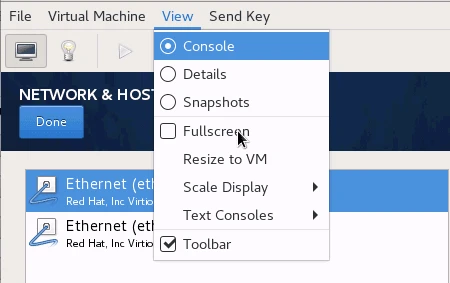

This should turn your qemu console into full screen mode.
Next to exit full screen mode in qemu, first of all enter into a
FullScreen mode in the vnc viewer
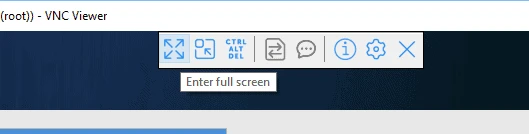
Now once you are in full screen mode of the vnc viewer, navigate your mouse in the top section of the console. At one point in the top section while moving your mouse cursor you should see a small pop up like below
this will appear in the middle top section of the qemu console on
virt-manager (inside vnc viewer). Here the first icon is to
Leave FullScreen. Once you click on this option, you should
successfully exit full screenmode in qemu virt-manager. Once done, you
can also exit the full screen mode in your vnc viewer.
Lastly I hope the steps from the article to exit full screen mode in qemu virt-manager in Linux was helpful. So, let me know your suggestions and feedback using the comment section.
