
Getting started with containerd vs docker
As many of you know dockers have been a very powerful containerization tool that helps build, test and deploy applications in different environments seamlessly. It packages all the software dependencies into deployable containers which comprise the libraries, code, and runtime.
The core element here is the containers that are deployable across various environments which ease the application developments. In order to run these containers on the host system, we use containerd which is the container runtime of Docker.
In this article, let us, deep dive, into containerd and docker and understand the difference between them.
Understanding Docker Engine
TheDocker engineis the core software that runs and manages containers. We often refer to it simply asDocker.
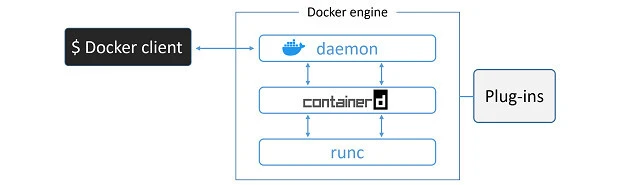
At the time of writing, the major components that make up the Docker engine are; theDocker daemon,containerd,runc, and various plugins such as networking and storage. Together, these create and run containers.
containerd
As part of the effort to strip functionality out of the Docker daemon,
all of the container execution logic was ripped out and refactored into
a new tool calledcontainerd(pronounced container-dee). Its sole
purpose in life was to manage container lifecycle operations —start
| stop | pause | rm….
containerdis available as a daemon for Linux and Windows, and Docker has been using it on Linux since the 1.11 release. In the Docker engine stack,containerdsits between the daemon and runc at the OCI layer.
One of the reasons for adding more functionality is to make it easier to use in other projects. For example, in projects like Kubernetes, it was beneficial forcontainerdto do additional things like push and pull images. For these reasons,containerdnow does a lot more than simple container lifecycle management.
How containerd is related to docker?
Containerd is an open-source containerization platform that manages to create, start, stop and kill docker containers. It is helpful in all the operations that the user performs with the Docker CLI.
Let us understand how this is used with an example.
Consider running an Nginx container with
$docker run -p 80:80 -d nginxcommand.
When you run the above command, the docker asks the container runtime to pull the docker image and create a container from the Nginx image. Also, since the ports are exposed, it is also possible to connect to the web and host this application on the web.
In the backend, what happens is the containerd pulls the Nginx image from the dockerhub and creates a container out of it.
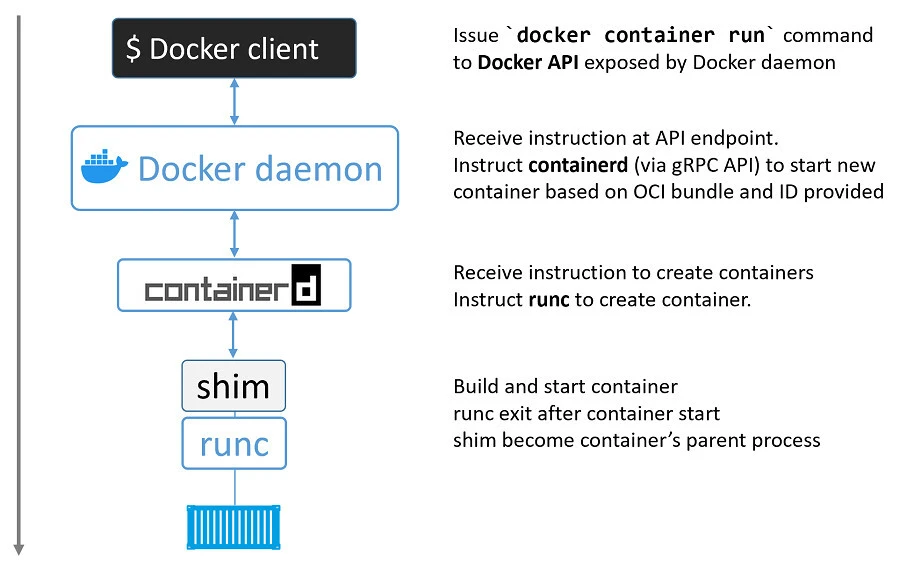
Let us define the workflow of this operation.
- When we run the command, initially the Docker CLI accepts the user command and passes it into the docker daemon which runs in the background of any docker process.
- Upon receiving the input, it further passes on instructions to containerd which is another process and it pulls the nginx docker image.
- Further containerd calls another application to perform operations which is called runc which is a low-level container runtime. In this case, it starts the nginx docker container.
In simple words, containerd is a high-level container runtime. It can be considered a container manager which
- helps to download/upload the container images
- establishes docker to docker communications by setting up the networks
- start/stop/kill docker containers.
In a few cases, containerd asks another application to perform operations which is called runc which is a low-level container runtime.
Docker as a whole system comprises docker client, docker daemon, containerd, runc. This was considered to be the older way of docker and for a few years the docker developers separated out all these components to make the developer’s life easy and to debug the issues. Sounds interesting, isn’t it?
The new docker approach gives users the flexibility to choose and run the components that are required. This plug-and-play option has helped a lot of developer communities thereby making their application to be functional and consistent.
Previously, we saw what exactly happens when the user hits the docker command.So, now we know that with the new docker approach, we can eliminate docker CLI and docker daemon in our execution environment.
As a result of this, we can save a lot of our system’s memory. Hence, we can have a containerd and runc running in our system which will execute the user commands and complete the docker operations.
In a nutshell, containerd can still be used instead of docker as it can interact with low-level components which communicate with Operating System’s Kernel inorder to spin off containers and perform in a way that docker does.
How to interact with containerd
There are several ways to interact with containerd using command-line interfaces like ctr, nerdctl and crictl
In case you have docker installed on your system, you will have containerd running by default. If you want to interact with the containerd, there is a utility called ctr which helps you do this.
Let us understand in detail with an example.
$ ctr
Output
NAME:
ctr -
__
_____/ /______
/ ___/ __/ ___/
/ /__/ /_/ /
\___/\__/_/

containerd CLI

USAGE:
ctr [global options] command [command options] [arguments...]

VERSION:
1.5.9-0ubuntu3

DESCRIPTION:

ctr is an unsupported debug and administrative client for interacting
with the containerd daemon. Because it is unsupported, the commands,
options, and operations are not guaranteed to be backward compatible or
stable from release to release of the containerd project.

COMMANDS:
plugins, plugin      provides information about containerd plugins
version          print the client and server versions
containers, c, container  manage containers
content          manage content
events, event       display containerd events
Consider pulling the Nginx docker image using the below command
$ sudo ctr images pull docker.io/library/nginx:latest
The ctr utility helps the user to interact with contained for debugging purposes. It will output the details of the steps and the status of the command execution as shown below.
docker.io/library/nginx:latest:                                                   resolved       |++++++++++++++++++++++++++++++++++++++|
index-sha256:2f770d2fe27bc85f68fd7fe6a63900ef7076bc703022fe81b980377fe3d27b70:    done           |++++++++++++++++++++++++++++++++++++++|
manifest-sha256:bab399017a659799204147065aab53838ca6f5aeed88cf7d329bc4fda1d2bac7: done           |++++++++++++++++++++++++++++++++++++++|
layer-sha256:8d634ce99fb933cae83bf1ebc98ca6a4bc683f632320ececee060ea84d2785fe:    done           |++++++++++++++++++++++++++++++++++++++|
layer-sha256:98b0bbcc0ec67f3b41dc3140ee2fe804d410548392307a2c6d4f9921ea30261f:    done           |++++++++++++++++++++++++++++++++++++++|
layer-sha256:bd159e379b3b1bc0134341e4ffdeab5f966ec422ae04818bb69ecef08a823b05:    done           |++++++++++++++++++++++++++++++++++++++|
layer-sha256:6ab6a6301bdeddbcd0e6193262b2c54740f4ea12640c81c951223cdd5ec842a3:    done           |++++++++++++++++++++++++++++++++++++++|
layer-sha256:fe24ce36f968b9315f7713fee767d50444dea2b59951f171054cb4e3c12d4b81:    done           |++++++++++++++++++++++++++++++++++++++|
layer-sha256:f5d8edcd47b1b04e279cc2414cad5c38b423d1d5ee9801ca7c81ef63d0941c98:    done           |++++++++++++++++++++++++++++++++++++++|
config-sha256:51086ed63d8cba3a6a3d94ecd103e9638b4cb8533bb896caf2cda04fb79b862f:   done           |++++++++++++++++++++++++++++++++++++++|
elapsed: 33.7s                                                                    total:  24.2 M (734.8 KiB/s)
unpacking linux/amd64 sha256:2f770d2fe27bc85f68fd7fe6a63900ef7076bc703022fe81b980377fe3d27b70...
done: 9.916649937s
Conclusion
In this article, we have learned about the differences between docker and containerd. Container execution is handled by containerd. You can think of it as a container supervisor that handles container lifecycle operations. It is small and lightweight and can be used by other projects and third-party tools. For example, it’s becoming the most common container runtime in Kubernetes.
By default, Docker usesruncas its default container runtime. runc is the de facto implementation of the OCI runtime-spec and expects to start containers from OCI-compliant bundles. containerd talks to runc and ensures Docker images are presented to runc as OCI-compliant bundles.
In case you have any doubts, please feel free to add your questions in the comment section below and I shall try to respond at the earliest.
Happy learning!!
References
https://containerd.io/
https://github.com/containerd/containerd/blob/main/docs/getting-started.md
