

In production environment, security is one of the most important factor due to which we perform regular security scans and perform regular patch management to fix security vulnerabilities. One such vulnerability is related to ICMP timestamp request so in this article we will learn the steps to disable ICMP timestamp responses using different iptables and firewalld in RHEL/CentOS 7/8 Linux.
Overview on ICMP timestamp responses
- ICMP i.e. Internet Control Message Protocol is a supporting protocol in the Internet protocol suite.
- It is used by network devices, including routers, to send error messages and operational information indicating success or failure when communicating with another IP address
- ICMP timestamp responses consists of ICMP Timestamp Request and ICMP Timestamp Reply
- At the time of writing this article, there were 343 assigned ICMP Types.
- In this list, ICMP Type 13 is referred as timestamp request while ICMP Type 14 is referred as timestamp reply
hping3 using EPEL repo on both of my RHEL/CentOS 8
servers to verify ICMP timestamp responses. You can also install nmap
and use nping --icmp-type -v to verify ICMP
timestamp status
In production environment, most of the security scanning tools such as VAMS, Nessus etc will recommend to disable ICMP timestamp responses in Linux
How timestamp request and reply can be used by attacker?
The target computer responded to an ICMP timestamp request.
By accurately determining the target’s clock state, an attacker can more effectively attack certain time-based pseudorandom number generators (PRNGs) and the authentication systems that rely on them.
Method 1: Block ICMP timestamp responses with IPtables
To block ICMP timestamp request we must create a rule in the INPUT
chain while to block ICMP timestamp reply we need a rule in the OUTPUT
chain
[root@server2 ~]# iptables -A INPUT -p icmp --icmp-type timestamp-request -j DROP
[root@server2 ~]# iptables -A OUTPUT -p icmp --icmp-type timestamp-reply -j DROP
Let us understand the meaning of these iptables rule,
-A INPUT      Append (not Insert) a new rule inside INPUT chain.
            If we do append, the rule will be added in the last of existing rules,
            if you using -I INPUT then the rule will inserted as the first rule in the existing rule set

-A OUTPUT          Again, append the rule instead of INSERT

-p icmp            -p or --protocol can be used which means
            the protocol of the rule or of the packet to check i.e. icmp here

--icmp-type        provide the icmp type for the rule

-j DROP        -j or --jump specifies the target of the rule
            Here we want to DROP the respective packets
So you can understand that I have added an iptables rule incoming to
my INPUT chain of the node and also DENY any outgoing
timestamp-reply from the node using OUTPUT chain
Verify the timestamp responses
Check if your iptables rules are added successfully
[root@server2 ~]# iptables -L | grep timestamp
DROP       icmp --  anywhere             anywhere             icmp timestamp-request
DROP       icmp --  anywhere             anywhere             icmp timestamp-reply
Now you can use number of tools such as hping3 or nping to
artificially generate timestamp request and timestamp-reply for the
verification.
We will use hping3 to generate and send ICMP timestamp-request and
timestamp-reply.
[root@server1 ~]# hping3 --icmp --icmptype 13 server2
HPING server2 (eth1 10.10.10.16): icmp mode set, 28 headers + 0 data bytes
^C
--- server2 hping statistic ---
3 packets transmitted, 0 packets received, 100% packet loss
round-trip min/avg/max = 0.0/0.0/0.0 ms
There was 100% packet loss for the 3 packets which were sent to
timestamp-request
Next we will verify timestamp-reply status from server2
[root@server2 ~]# hping3 --icmp --icmptype 14 centos8-1
HPING centos8-1 (eth1 10.10.10.12): icmp mode set, 28 headers + 0 data bytes
[send_ip] sendto: Operation not permitted
Here we get Operation not permitted which means ICMP timestamp reply
is not allowed from server2
So our iptables rules are working as expected. next let us block ICMP
timestamp responses using firewalld. There are multiple methods within
firewalld which can be used to block ICMP timestamp responses. I will
share some of them here
Delete iptables rule
To delete this rules we will use below syntax:
iptables --delete {CHAIN} {RULE_NUMBER}
To get the rule number execute
[root@server2 ~]# iptables -L INPUT --line-numbers | grep timestamp
6    DROP       icmp --  anywhere             anywhere             icmp timestamp-request

[root@server2 ~]# iptables -L OUTPUT --line-numbers | grep timestamp
2    DROP       icmp --  anywhere             anywhere             icmp timestamp-reply
So we must delete rule number 6 in the INPUT chain and rule number
2 in the OUTPUT chain
[root@server2 ~]# iptables --delete INPUT 6
[root@server2 ~]# iptables --delete OUTPUT 2
Verify if there are any more rules related to ICMP timestamp
[root@server2 ~]# iptables -L --line-numbers | grep timestamp
Method 2: Block ICMP timestamp responses with Firewalld Direct Rule
Similar to iptables we can create a rule using for INPUT and
OUTPUT chain using firewalld
Syntax:
firewall-cmd --direct --add-rule { ipv4 | ipv6 | eb } <table> <chain> <priority> <args>
Add firewalld direct rules
To block and drop ICMP timestamp-request
[root@server2 ~]# firewall-cmd --permanent --direct --add-rule ipv4 filter INPUT -5 -p icmp --icmp-type timestamp-request -j DROP
success
To block and drop ICMP timestamp-reply
[root@server2 ~]# firewall-cmd --permanent --direct --add-rule ipv4 filter OUTPUT -5 -p icmp --icmp-type timestamp-reply -j DROP
success
Let us understand the firewalld command here
- We are adding a
DIRECTrule for IPv4 (sinceICMPtimestamp responses are supported only over IPv4) in theINPUTandOUTPUTchain for filter table - This rule will have a priority
lower than 0(you can learn more about priorities atfirewalldhelp page) - The remaining part of the rule is
ARGUMENTwhich is same as what we used foriptables
List the rules from INPUT and OUTPUT chain
[root@server2 ~]# firewall-cmd --permanent --direct --get-rules ipv4 filter INPUT
-5 -p icmp --icmp-type timestamp-request -j DROP

[root@server2 ~]# firewall-cmd --permanent --direct --get-rules ipv4 filter OUTPUT
-5 -p icmp --icmp-type timestamp-reply -j DROP
Verify the timestamp response
Next we will verify our rules by artificially generating type 13 and
14 ICMP responses.
The type 13 ICMP type i.e. timestamp request will be sent from a
client node (server1)
[root@server1 ~]# hping3 --icmptype 13 server2 -c 2
HPING 10.43.138.12 (bond0 10.43.138.12): icmp mode set, 28 headers + 0 data bytes

--- 10.43.138.12 hping statistic ---
2 packets transmitted, 0 packets received, 100% packet loss
round-trip min/avg/max = 0.0/0.0/0.0 ms
So we have 100% packet loss here which means the timestamp-request
rule is working, Next to verify type 14 we will try to send
timestamp-reply packets from server2 where we have configured our
firewalld direct rules using nping
[root@server2 ~]# nping -c1 --icmp-type 14 -v server1
Snippet from my terminal
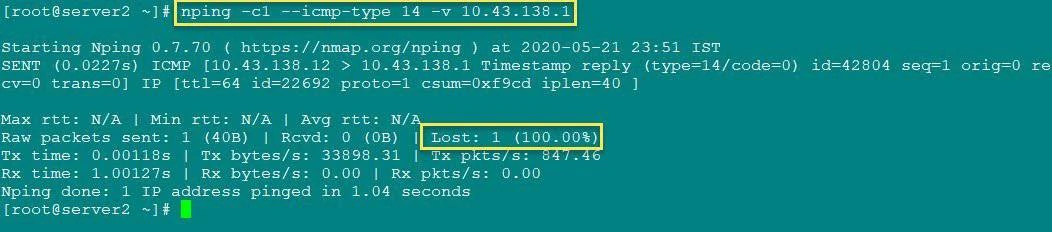
Verify firewalld direct rule
So this also resulted in 100% packet loss so our rules are working
Delete firewalld direct rules
To delete the firewalld direct rules which we created earlier, you
just need to copy the same command which we used for adding and replace
--add-rule with --remove-rule
[root@server2 ~]# firewall-cmd --permanent --direct --remove-rule ipv4 filter OUTPUT -5 -p icmp --icmp-type timestamp-reply -j DROP
success

[root@server2 ~]# firewall-cmd --permanent --direct --remove-rule ipv4 filter INPUT -5 -p icmp --icmp-type timestamp-request -j DROP
success
Next reload the firewall to make the changes reboot persistent.
[root@server2 ~]# firewall-cmd --reload
success
You can now try to list and check if these rules are still there in your
respective INPUT and OUTPUT chain
# firewall-cmd --permanent --direct --get-rules ipv4 filter OUTPUT
# firewall-cmd --permanent --direct --get-rules ipv4 filter INPUT
Method 3: Block ICMP timestamp responses with firewalld Rich Rules
With the “rich language” syntax, complex firewall rules can be created in a way that is easier to understand than the direct-interface method
Syntax:
firewall-cmd [--zone=zone] --add-rich-rule='rule' [--timeout=timeval]
This will add a rich language rule rule for “zone” zone. This option
can be specified multiple times. If the zone is omitted, the default
zone is used
The rule syntax:
rule [family="rule family"]
    [ source [NOT] [address="address"] [mac="mac-address"] [ipset="ipset"] ]
    [ destination [NOT] address="address" ]
    [ element ]
    [ log [prefix="prefix text"] [level="log level"] [limit value="rate/duration"] ]
    [ audit ]
    [ action ]
Add firewalld rich rules
Add these rules on your server
[root@server2 ~]# firewall-cmd --add-rich-rule 'rule family="ipv4" icmp-type name="timestamp-request" drop' --permanent
success

[root@server2 ~]# firewall-cmd --add-rich-rule 'rule family="ipv4" icmp-type name="timestamp-reply" drop' --permanent
success
Reload the firewalld rules to make the changes reboot persistent.
[root@server2 ~]# firewall-cmd --reload
success
The rules are self explanatory, we have combined our main rule which we
have used above in direct rules i.e.
“family="ipv4" icmp-type name="timestamp-request" drop” to be
configured as rich-rule with firewalld
To list the rich rules
[root@server2 ~]# firewall-cmd --list-all --permanent
Snippet from my terminal
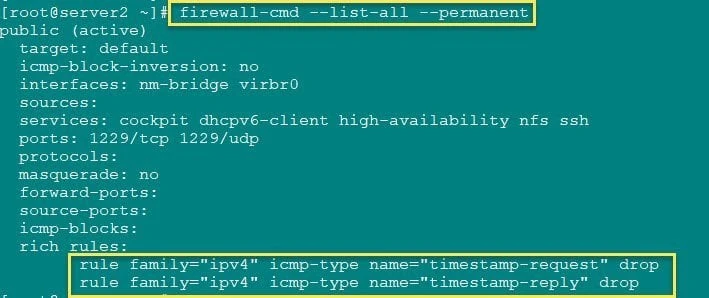
firewalld rich rule to block ICMP timestamp responses
Verify the timestamp responses
We will again use hping3 to generate and send timestamp-request
packets to server2
[root@server1 ~]# hping3 --icmptype 13 server2 -c 2
HPING 10.43.138.12 (bond0 10.43.138.12): icmp mode set, 28 headers + 0 data bytes

--- 10.43.138.12 hping statistic ---
2 packets transmitted, 0 packets received, 100% packet loss
round-trip min/avg/max = 0.0/0.0/0.0 ms
So both the packets we sent were dropped. Let us try to send
timestamp-reply packets from server2 to server1
[root@server2 ~]# nping -c2 --icmp-type 14 -v server1
Snippet from my terminal
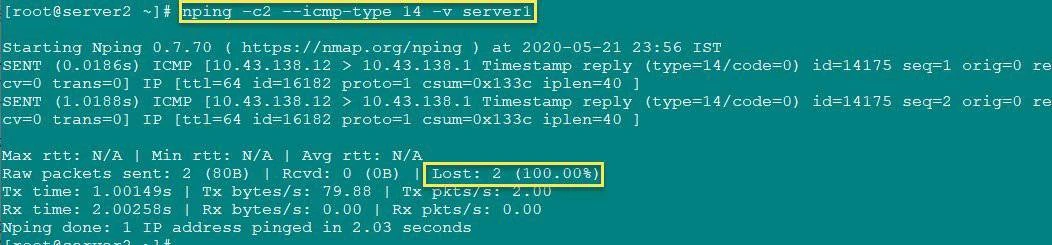
Verify firewall rich rule
Here also both our packets are lost so the firewalld rule is working
as expected
Delete firewalld rich rule
To delete a firewalld rich rule we will use the same command as used
to add the rule, just replace --add-rich-rule with
--remove-rich-rule
[root@server2 ~]# firewall-cmd --remove-rich-rule 'rule family="ipv4" icmp-type name="timestamp-reply" drop' --permanent
success

[root@server2 ~]# firewall-cmd --remove-rich-rule 'rule family="ipv4" icmp-type name="timestamp-request" drop' --permanent
success
Next reload the firewalld to make the changes reboot persistent
[root@server2 ~]# firewall-cmd --reload
success
Conclusion
We learned that ICMP timestamp responses are not considered secure by most of the security scanning tool. If you are working in production environment where security is considered priority then you should already know that these ICMP type packets are always blocked within the network.
You can choose your preferred method to block these packets, you can
also use
firewall-cmd --add-icmp-block=timestamp-request --add-icmp-block=timestamp-reply
but I personally didn’t had proper SUCCESS with this command in
RHEL/CentOS 8.
As with RHEL/CentOS 8, firewalld now uses nftables instead of
iptables and it was not able to DROP these packets although I was
getting UNKNOWN request
# hping3 10.43.138.12 --icmp --icmp-ts -V
using virbr0, addr: 10.43.138.1, MTU: 1500
HPING 10.43.138.12 (virbr0 10.43.138.12): icmp mode set, 28 headers + 0 data bytes
ICMP Packet filtered from ip=10.43.138.12 name=UNKNOWN
ICMP Packet filtered from ip=10.43.138.12 name=UNKNOWN
ICMP Packet filtered from ip=10.43.138.12 name=UNKNOWN
ICMP Packet filtered from ip=10.43.138.12 name=UNKNOWN
^C
--- 10.43.138.12 hping statistic ---
4 packets transmitted, 4 packets received, 0% packet loss
round-trip min/avg/max = 0.0/0.0/0.0 ms
So I chose to use alternate methods such as DIRECT and RICH rules with
firewalld to disable ICMP timestamp responses
References
I have used below external references for this tutorial guide
Firewalld Rich Rules
Firewalld rule priorities
Basic iptables
tutorial with examples in Linux I
Basic iptables
tutorial with examples in Linux II
