
![Create HTTPS Server with Node.js [Simple Steps]](/create-https-server-with-node-js/create_https_web_server.jpg)
This tutorial shows you how to create HTTPS Server with Node.js using a self-signed SSL certificate. You will generate an SSL certificate, then use it to create a simple express server that receives user details from a form.
Here are the steps:
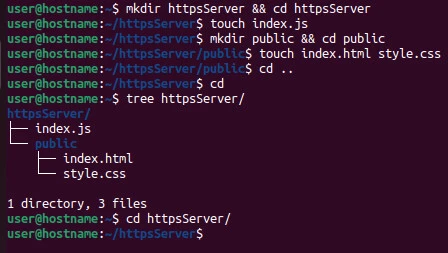
Step~1: Create the project structure
$ mkdir httpsServer && cd httpsServer
$ touch index.js
$ mkdir public && cd public
$ touch index.html style.css
$ cd ..
We create the project directory called httpsServer; main script file
called index.js; public folder to store static assets: index.html and
style.css.
Step~2: Initialize an NPM package
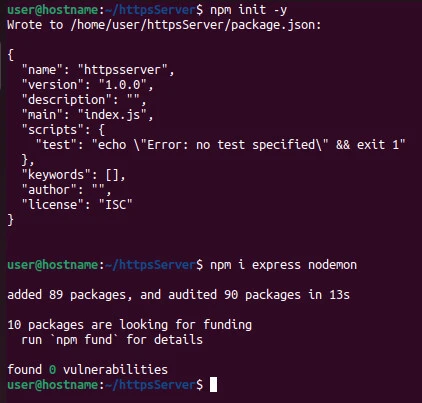
$ npm init -y
$ npm i express nodemon
We initialize an NPM package and install express and nodemon
modules. We will use the express module to create the server routes;
nodemon to watch the server for changes during development, so we
don’t have to keep restarting the server manually.
Step~3: Generate an SSL certificate
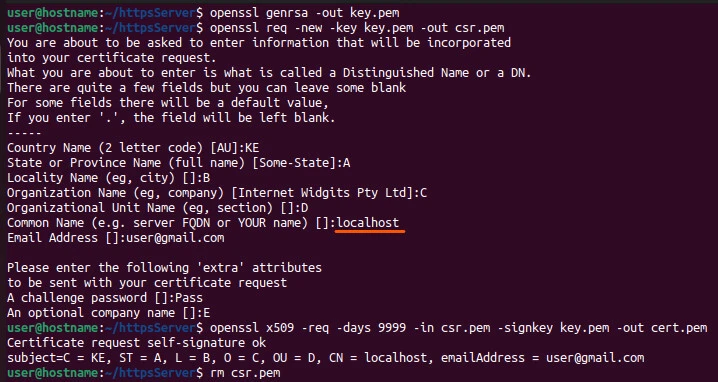
Run each of the lines. Then, answer prompts, filling the server FQDN tolocalhost because the certificate is self-signed on the local machine. You can check our extensive tutorial on openssl to learn more about working with certificates.
$ openssl genrsa -out key.pem
$ openssl req -new -key key.pem -out csr.pem
$ openssl x509 -req -days 9999 -in csr.pem -signkey key.pem -out cert.pem
$ rm csr.pem
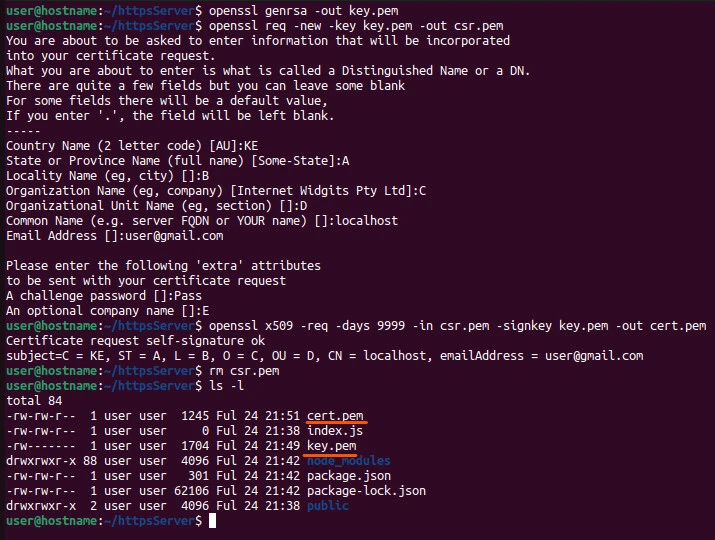
We get two files:
cert.pem: the certificate.
key.pem: the private key.
Step~4: Create an HTTPS server
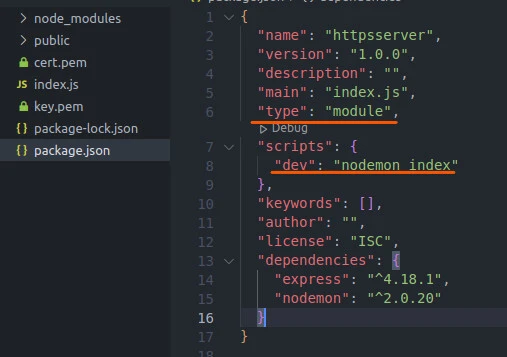
Open the project, modify the package.json file to accommodate ES
modules and run nodemon.
Package.json
{
  "name": "httpsserver",
  "version": "1.0.0",
  "description": "",
  "main": "index.js",
  "type": "module",
  "scripts": {
    "dev": "nodemon index"
  },
  "keywords": [],
  "author": "",
  "license": "ISC",
  "dependencies": {
    "express": "^4.18.1",
    "nodemon": "^2.0.20"
  }
}
The line "type": "module" switches the syntax from require function
const https = require("https")
to ES 6’s import keyword.
import https from "https"
The line "dev": "nodemon index" activates nodemon to watch the web
server.
index.js
import https from "https"
import fs from "fs"
import express from "express"

const app = express()

app.use(express.static('public'))
app.use(express.urlencoded({extended: true, limit: '3mb'}))

app.get("/", (req, res) => res.sendFile(`${__dirname}/index.html`))

app.post("/registration", (req, res) => {
    console.log(req.body)
    res.redirect("/")
})

const options = {
    key: fs.readFileSync('key.pem'),
    cert: fs.readFileSync('cert.pem')
}

const PORT = process.env.PORT || 3000
https.createServer(options, app).listen(PORT, console.log(`server runs on port ${PORT}`))
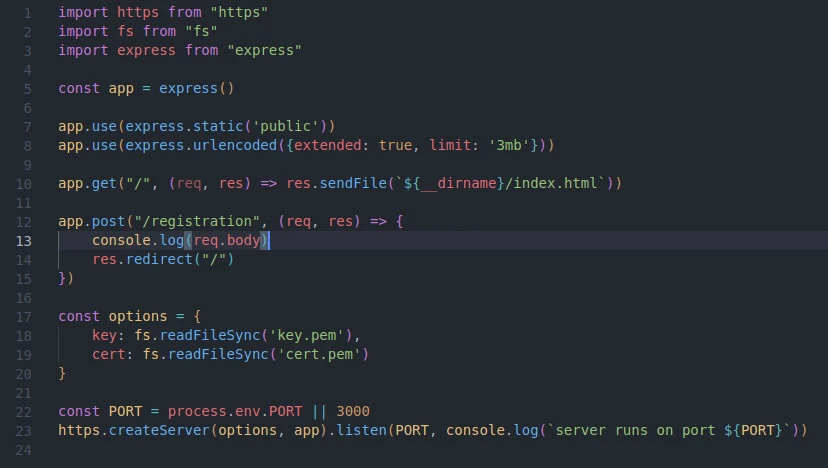
We import the modules.
import https from "https"
import fs from "fs"
import express from "express"
https
The https module is an improved version of the http module. We use
it to accommodate the SSL certificate through an options parameter.
fs
The file system (fs) module allows reading from
andwriting to the
disk. It gives asynchronous and synchronous (ending in Sync) control
of the code execution during the respective operations. For example,
the` readFileSync()` method halts the execution of other code
portions until the file reading process completes.
express
The express module is a pool of middleware. It has multiple methods
that intercept requests and control the response. We mainly use the
express function to create a web server and route requests to various
destinations.
After importing the modules, we call the express() function.
const app = express()

app.use(express.static('public'))
app.use(express.urlencoded({extended: true, limit: '3mb'}))

app.get("/", (req, res) => res.sendFile(`${__dirname}/index.html`))

app.post("/registration", (req, res) => {
    console.log(req.body)
    res.redirect("/")
})
We store the returned value of the function in the app variable. Using
express.static() method, we let express read our static files in the
public directory. And receive form data from index.html using the
urlencoded() method.
We then create a route for the landing page / and the registration
/registration endpoint. Upon receiving the express form body, we
console-log the details before redirecting the user to the landing page.
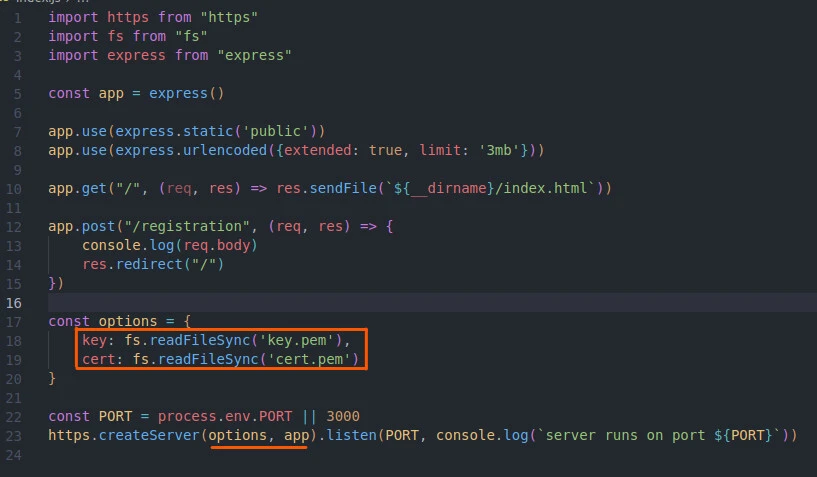
After we are done with routing, we implement the reading of the certificate information from the filesystem.
const options = {
    key: fs.readFileSync('key.pem'),
    cert: fs.readFileSync('cert.pem')
}
And use them in the HTTPS server.
const PORT = process.env.PORT || 3000
https.createServer(options, app).listen(PORT, console.log(`server runs on port ${PORT}`))
We pass the appand certificate details to the HTTPS server. That
converts the express routes from running on the default HTTP server to
the encrypted HTTPS server.
That is all we need to create and run an HTTPS server with self-signed
certificates. Now that you know how to create HTTPS Server with Node.js,
let’s implement the frontend to send the form data to the
/registrationendpoint.
Step~5: Send requests to the HTTPS server
index.html
Open the index.html file in the public directory and create two inputs:
text for username and email for user email.
<!DOCTYPE html>
<html lang="en">
<head>
    <meta charset="UTF-8">
    <meta http-equiv="X-UA-Compatible" content="IE=edge">
    <meta name="viewport" content="width=device-width, initial-scale=1.0">
    <link rel="stylesheet" href="style.css">
    <title>HTTPS Server</title>
</head>
<body>

<main>

    <h2>Register</h2>

    <form action="/registration" method="POST">
        <div>
            <input type="text" name="username" placeholder="Username" required>
        </div>
        <div>
            <input type="email" name="email" placeholder="Email" required>
        </div>
        <button>Send</button>
    </form>

</main>

</body>
</html>
style.css
* {
    margin: 0;
    padding: 0;
    box-sizing: border-box;
}
body {
    background: #f7f8fc;
    color:rgb(51, 22, 51);
}
h2 {
    text-align: center;
    margin-top: 3rem;
}
main {
    text-align: center;
}
form {
    width: 50%;
    margin: 3rem auto;
}
input, button {
    height: 3rem;
    width: 80%;
    padding: 0.5rem;
    margin: .5rem 0;
    border-radius: 3px;
    border: 1px solid #ccc;
}
button {
    background:rgb(51, 22, 51);
    color: #ccc;
    cursor: pointer;
}
With the frontend out of the way, we can start sending requests on the HTTPS server.
Start the server.
npm run dev
Open the browser through the https://localhost:3000 URL.
Note: The default localhost:3000 that uses HTTP won’t work because our server runs on HTTPS instead.
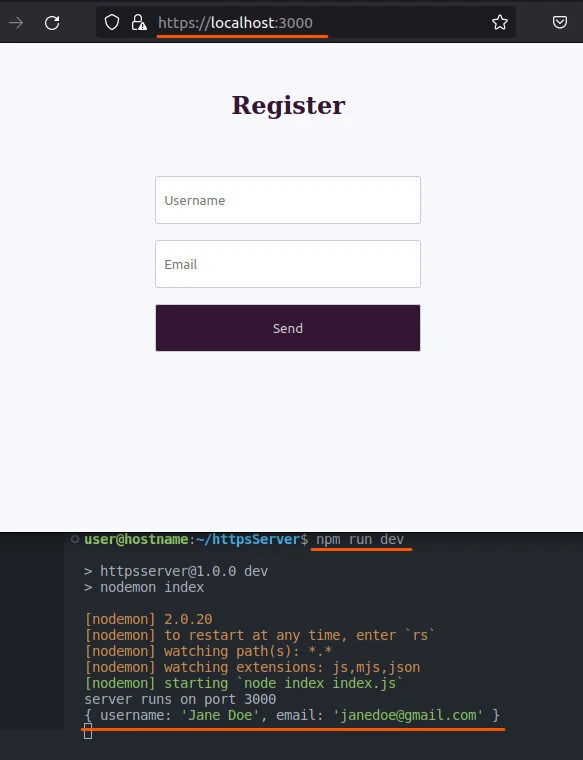
Although we use the encrypted channel, most browsers may warn that the site is unsafe because the SSL certificate is self-signed, not signed by a Certificate Authority (CA) like Let’s Encrypt. That calls for using a CA-signed certificate in production, often sold by the domain provider.
Conclusion
This tutorial showed you how to create HTTPS Server with Node.js in 5
straightforward steps. You generated a self-signed SSL certificate and
used it in an HTTPS server built with the https, fs , and express
modules.
