

In this article I will share the steps to configure software raid 5 using three disks but you can use the same method to create software raid 5 array for more than 3 disks based on your requirement. I will explain this in more detail in the upcoming chapters. I have written another article with comparison and difference between various RAID types using figures including pros and cons of individual RAID types so that you can make an informed decision before choosing a RAID type for your system
RAID 5: Distributed Parity
RAID 5 is similar to RAID-4, except that the parity information is spread across all drives in the array. This helps reduce the bottleneck inherent in writing parity information to a single drive during each write operation.
How does RAID 5 works?
RAID-5 eliminates the use of a dedicated parity drive and stripes parity information across each disk in the array, using the same XOR algorithm found in RAID-4. During each write operation, one chunk worth of data in each stripe is used to store parity. The disk that stores parity alternates with each stripe, until each disk has one chunk worth of parity information. The process then repeats, beginning with the first disk.
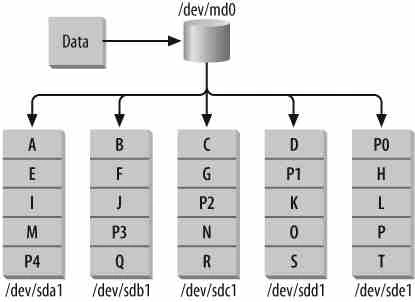
Take the example of a RAID-5 with five member disks. In this case, every
fifth chunk-sized block on each member disk will contain parity
information for the other four disks. This means that, as in RAID-1 and
RAID-4, a portion of your total storage space will be unusable. In an
array with five disks, a single disk’s worth of space is occupied by
parity information, although the parity information is spread across
every disk in the array. In general, if you have N disk drives in a
RAID-5, each of size S, you will be left with (N-1) * S space
available. So, RAID-4 and RAID-5 yield the same usable storage.
Why choose RAID 5 over RAID 4?
RAID-5 has become extremely popular among Internet and e-commerce companies because it allows administrators to achieve a safe level of fault-tolerance without sacrificing the tremendous amount of disk space necessary in a RAID-1 configuration or suffering the bottleneck inherent in RAID-4. RAID-5 is especially useful in production environments where data is replicated across multiple servers, shifting the internal need for disk redundancy partially away from a single machine.
Step-by-Step Tutorial: Configure Software RAID 0 in Linux
Step-by-Step Tutorial: Configure Software RAID 1 in Linux
Step-by-Step Tutorial: Configure Software RAID 4 in Linux
Step-by-Step Tutorial: Configure Hybrid Software RAID 10 in Linux
Configure Software RAID 5
There are below certain steps which you must follow before creating software raid 5 on your Linux node. Since I have already performed those steps in my older article, I will share the hyperlinks here:
<a
href=“https://www.golinuxcloud.com/configure-software-linear-raid-linux/#Important_Rules_of_partitioning" target="_blank” rel=“noopener noreferrer” title=“Step-By-Step Tutorial: Configure Software Linear RAID 0 In Linux”>Important Rules of Partitioning
<a
href=“https://www.golinuxcloud.com/configure-software-linear-raid-linux/#Partitioning_with_fdisk" target="_blank” rel=“noopener noreferrer” title=“Step-By-Step Tutorial: Configure Software Linear RAID 0 In Linux”>Partitioning with fdisk
Create Software RAID 5 Array
Now since we have all the partitions with us, we will create software RAID 4 array on those partitions
[root@node1 ~]# lsblk
NAME            MAJ:MIN RM  SIZE RO TYPE  MOUNTPOINT
sda               8:0    0   30G  0 disk
├─sda1            8:1    0  512M  0 part  /boot
└─sda2            8:2    0 27.5G  0 part
  ├─centos-root 253:0    0 25.5G  0 lvm   /
  └─centos-swap 253:1    0    2G  0 lvm   [SWAP]
sdb               8:16   0    2G  0 disk
└─sdb1            8:17   0    2G  0 part
sdc               8:32   0    2G  0 disk
└─sdc1            8:33   0    2G  0 part
sdd               8:48   0    2G  0 disk
└─sdd1            8:49   0    2G  0 part
sr0              11:0    1 1024M  0 rom
Execute the below command to create software raid 5 array using
/dev/sdb1, /dev/sdc1 and /dev/sdd1
[root@node1 ~]# mdadm -Cv -l5 -c64 -n3 -pls /dev/md0 /dev/sd{b,c,d}1
mdadm: /dev/sdb1 appears to contain an ext2fs file system
       size=2096128K  mtime=Wed Jun 12 11:21:25 2019
mdadm: size set to 2094080K
Continue creating array? y
mdadm: Defaulting to version 1.2 metadata
mdadm: array /dev/md0 started.
mdadm defaults to the left-symmetric algorithm, so you can safely
omit the -p option from the command line.
Here,
-C, --create
       Create a new array.

-v, --verbose
       Be  more  verbose about what is happening.

-l, --level=
       Set RAID level.  When used with --create, options are: linear, raid0,  0,  stripe,  raid1,  1,  mirror,
       raid4,  4,  raid5,  5, raid6, 6, raid10, 10, multipath, mp, faulty, container.  Obviously some of these
       are synonymous.

-c, --chunk=
       Specify chunk size of kilobytes.

-n, --raid-devices=
       Specify  the number of active devices in the array.

-p, --layout=
       This option configures the fine details of data layout for RAID5, RAID6, and RAID10 arrays, and controls the failure  modes
       for faulty.

       The  layout of the RAID5 parity block can be one of left-asymmetric, left-symmetric, right-asymmetric, right-symmetric, la,
       ra, ls, rs.  The default is left-symmetric.
Verify the Changes
RAID-5 provides a cost-effective balance of performance and redundancy. You can add more disks, using device/raid-disk, or spare disks, using device/spare-disk, to create large, fault-tolerant storage.
[root@node1 ~]# cat /proc/mdstat
Personalities : [raid6] [raid5] [raid4]
md0 : active raid5 sdd1[3] sdc1[1] sdb1[0]
      4188160 blocks super 1.2 level 5, 64k chunk, algorithm 2 [3/2] [UU_]
      [=======>.............]  recovery = 38.1% (800128/2094080) finish=0.0min speed=266709K/sec

unused devices: <none>
Create filesystem and mount point
Once all three arrays are activated, simply build a filesystem on the
stripe/dev/md0, in this case and then mount/dev/md0 on a mount
point. I have already written an article to create a filesystem and mount
point to access the filesystem, you can follow the same article
and create your required filesystem on /dev/md0 to access the software
raid 5 array.
Create Software RAID 5 with more disks
To create a software raid 5 array using 5 disk partitions, you can use below command
# mdadm -C -l5 -c64 -n5 -x1 /dev/md0 /dev/sd{b,f,c,g,d,h}1
During a disk failure, RAID-5 read performance slows down because each time data from the failed drive is needed, the parity algorithm must reconstruct the lost data. Writes during a disk failure do not take a performance hit and will actually be slightly faster. Once a failed disk is replaced, data reconstruction begins either automatically or after a system administrator intervenes, depending on the hardware.
Once the sync is complete re-validate the output of mdstat
[root@node1 ~]# cat /proc/mdstat
Personalities : [raid6] [raid5] [raid4]
md0 : active raid5 sdd1[3] sdc1[1] sdb1[0]
      4188160 blocks super 1.2 level 5, 64k chunk, algorithm 2 [3/3] [UUU]

unused devices: <none>
Lastly I hope the steps from the article to configure software raid 5 array on Linux was helpful. So, let me know your suggestions and feedback using the comment section.
References:
Managing RAID in
Linux
