
![.bashrc vs .bash_profile [Which one to use?]](/bashrc-vs-bash-profile/bashrc.jpg)
We have different configuration files which are used to setup system
wide configuration. But we always have some requirement to setup user
specific customization such as umask, alias, PATH variable etc. In such
case we can use these user specific configuration files such as
.bashrc, .bash_profile.
But which file should you choose?
List of bash startup files
Before we go ahead and learn the difference between .bashrc and
.bash_profile in detail, let me list down the different bash
configuration file present in most Linux distributions
| File | Description |
|---|---|
| /etc/profile | This is the system-wide initialization file executed during login. It usually contains <a |
| href=“https://www.golinuxcloud.com/where-to-set-environment-variables-in-linux/" | |
| target="_blank” rel=“noopener noreferrer” | |
| title=“Where to set environment variables in Linux? [SOLVED]">environment | |
| variables, including an initial PATH, and startup programs. | |
| /etc/bashrc | This is another system-wide initialization file that may be executed by a user’s .bashrc for each bash shell launched. It usually contains functions and aliases. |
| ~/.bash_profile | If this file exists, it is executed automatically after /etc/profile during login |
| ~/.bash_login | If .bash_profile doesn’t exist, this file is executed automatically during login |
| ~/.profile | If neither .bash_profile nor .bash_login exists, this file is executed automatically during login. This is the default in Debian-based distributions, such as Ubuntu. Note that this is the original Bourne shell configuration file |
| ~/.bashrc | This file is executed when a non-interactive bash shell starts, i.e., a new terminal window in X. This file is often referred to in the bash interactive scripts, such as ~/.bash_profile |
| ~/.bash_logout | This file is executed automatically during logout |
.bashrc vs .bash_profile
- The primary thing to understand is that the
rcfiles are for all shell invocations while theprofilesare strictly for interactive shells. - An interactive shell is where you (end user) types the command while
an non-interactive shell is when shells are launched by other
programs such as a script with
#!/bin/bashas SHEBANG value - By default
~/.bashrcis executed as part of~/.bash_profileto load the alias function - Now if I comment out the part which executes
.bashrcinside~/.bash_profile, let’s check the outcome:
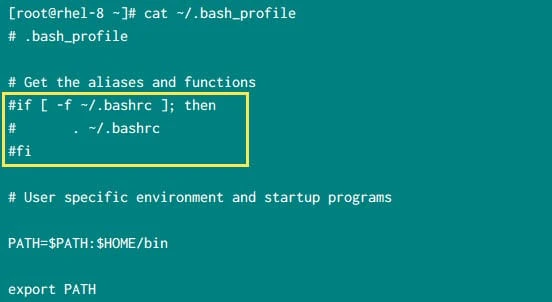
Next I will add an echo statement inside ~/.bashrc
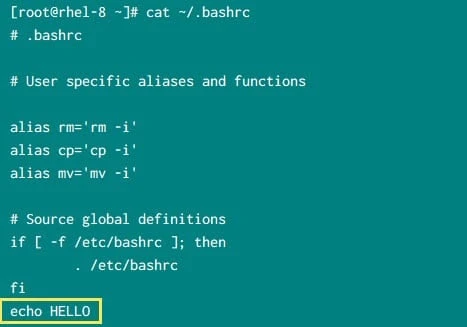
Now let’s verify different scenarios and check if .bashrc is executed
which should print HELLO on STDOUT
Opened a duplicate shell (.bashrc was not executed)
If you are already logged in and just open a new terminal:
login as: root
root@127.0.0.1's password:
Last login: Fri Sep  4 10:35:47 2020
[root@server ~]#
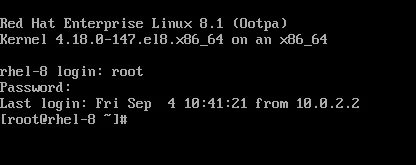
Logged in using console (.bashrc was not executed)
Below is the snippet from my console
Using switch user (.bashrc was not executed)
[deepak@server ~]$ su - root
Password:
Last login: Fri Sep  4 10:42:00 IST 2020 on tty1
[root@server ~]#
Login
via SSH
from a different server (.bashrc was not executed)
In this example I will login to this server using some external node to
check if .bashrc is executed:
[root@ext ~]# ssh 192.168.43.10
root@192.168.43.10's password:
Last login: Fri Sep  4 10:48:44 2020
[root@server ~]#
Start a new instance using bash (.bashrc was executed)
When we just start a new shell by typing bash on the shell
[root@server ~]# bash
HELLO
And now .bashrc was
executed as we see HELLO is printed on the screen
- If we reverse the situation, i.e. add “
echo HELLO” in~/.bash_profileinstead of~/.bashrcthen we get just the opposite results. - So to summarise when you login via SSH, or via duplicate console,
or via switch user:
.bash_profileis executed to configure your shell before the initial command prompt. - But, if you’ve already logged into your machine and open a new
terminal window (xterm) or just start a new bash instance just by
typing
/bin/bashin a terminal then.bashrcis executed before the window command prompt.
How .bashrc and .bash_profile file are created for every user?
- To understand this, you must be familiar with
skelwhich is short abbreviation forskeleton - The
skeletondirectory contains files and directories which is copied inside the user’s home directory, when the home directory is created byuseradd useraddby default refers to/etc/default/useraddto get the default value of skel i.e./etc/skel- So,
/etc/skelcontains a bunch of hidden configuration files which are coped to user’s home folder when the home folder is created withuseraddcommand
Check the content of /etc/skel. Since the files
are hidden, I have used -a with ls command:
# ls -al /etc/skel/
total 20
drwxr-xr-x.  2 root root 4096 Nov 13  2019 .
drwxr-xr-x. 86 root root 4096 Sep  4 09:11 ..
-rw-r--r--.  1 root root   18 Aug 30  2019 .bash_logout
-rw-r--r--.  1 root root  141 Aug 30  2019 .bash_profile
-rw-r--r--.  1 root root  312 Aug 30  2019 .bashrc
What is the order of execution for .bash_profile, /etc/profile and ~/.profile?
- As per the man page of bash when
bash is invoked as an interactive login shell, or as a non-interactive
shell with the
--loginoption, it first reads and executes commands from the file/etc/profile, if that file exists. - After reading that file, it looks for
~/.bash_profile,~/.bash_login, and~/.profile, in that order, and reads and executes commands from the first one that exists and is readable. - If there is a file named
~/.bash_profileand it is readable, it will be read, and~/.profilewill be ignored. - The documentation says it will execute the first file in the list found, not all of them.
In most cases ~/.bash_profile will be present inside users’ home
directory. So if you wish to also execute content of ~/.profile along
with ~/.bash_profile you can either make ~/.bash_profile source
.profile, or if ~/.bash_profile contents are not useful, can make it a
symbolic link to .profile
For example:
$ cat >> ~/.bash_profile <<EOF
if [ -f ~/.profile ]; then
    if [ x$READING_PROFILE = x ]; then
        READING_PROFILE=yes
        export READING_PROFILE
        source ~/.profile
        unset READING_PROFILE
    fi
fi
EOF
The above READING_PROFILE variable is just to make sure it does not
enter an infinite recursion.
Which file (.bashrc or .bash_profile) should we modify?
- As a general rule, to add directories to your
PATHor define additional environment variables, place those changes in.bash_profile(or the equivalent, according to your distribution; for example, Ubuntu uses.profile). - For everything else, place the changes in
.bashrc. - You can also choose to create a user specific configuration file
inside
/etc/profile.d.
For example:
# cat /etc/profile.d/custom.sh
#!/bin/bash

if [[ "$(id -u -n)" == "deepak" ]];then
   alias ls='ls -lah'
fi
- So instead of using
~/.bash_profilewe have created a configuration file inside/etc/profile.dwhich will be executed only for user “deepak” - This approach is better and cleaner when you have multiple users in your environment.
Conclusion
In this tutorial I gave you a detailed overview on different
configuration files available in Linux. The usage of .bashrc,
.bash_profile, .profile can be confusing in the beginning but once
you get your hands dirty you will understand the difference.
Lastly I hope this guide on difference between .bashrc vs
.bash_profile on Linux was helpful. So, let me know your suggestions
and feedback using the comment section.
Further Reading
What’s
the difference between .bashrc, .bash_profile, and .environment?
Differences,
uses and similarities between .bashrc .bash_profile and /etc/profile
