

Using bash while loop has it’s own advantages compared to any other loops. How do you perform a certain task repeatedly in Linux or Unix environment? For example, how can you monitor a log file looking for specific log message and once the message appears the script should exit? There are many such tasks for a System Administrator where using such loop conditions can be life savior.
In this absolute beginners tutorial I will share different usage of while loops in bash environment along with real time shell script examples and will try to be as basic as possible so even a fresher can easily understand this topic.
Basic while loop syntax in Bash
The syntax of while loop would vary based on the programming language you choose such as C, perl, python, go etc. The provided syntax can be used only with bash and shell scripts
while CONDITION
do
    CONSEQUENT-COMMANDS
done
Understanding the syntax
- The
CONDITIONcan be any type of condition such as using comparison operators, adding command check etc. - Based on the condition next
CONSEQUENT-COMMANDSwill execute - The
CONSEQUENT-COMMANDSshould handle when the loop iteration should complete andEXITor else the loop would continue to run for infinite period - Once the
CONSEQUENT-COMMANDSis completed, the script would go to “done” andEXITthe loop
Example-1: Use bash while loop with comparison operator
- We will start with the basics, i.e. using
comparison
operator as
CONDITIONto perform certain task - In this script, I have defined two variables
aandb - We want to run the loop until
ais less than or equal tobvariable - To achieve this I will append the value of
awith1every time an iteration completes
a=5
b=10

while [ $a -le $b ]
do
   echo "Iteration Number: $a"
   a=$((a+2))
done
The output from this script
Iteration Number: 5
Iteration Number: 6
Iteration Number: 7
Iteration Number: 8
Iteration Number: 9
Iteration Number: 10
Now instead of using ((a++)), we can also use a=$((a+1)) which will
be more helpful in real time environments, Do you know why?
With ((a++)) you are appending the value of a+1 for every iteration,
but what if you have a requirement to append the value of a with 2
or different number as in below example:
a=5
b=10

while [ $a -le $b ]
do
   echo "Iteration Number: $a"
   a=$((a+2))
done
The output from this script, in this example, the loop iterates and
adds +2 to the a variable every time loop completes
Iteration Number: 5
Iteration Number: 7
Iteration Number: 9
In this shell script example, I will read input from the user for both the variables
read -r -p "Enter first number: " a
read -r -p "Enter second number: " b

while [ $a -le $b ]
do
   echo "Iteration Number: $a"
   a=$((a+1))
done
You can add any type of comparison operators in the condition section
Example-2: Use bash while loop with “true” - infinite Loop
One of the good or bad things with while loop, it’s advantage of
running the loop for infinite period of time until the condition
matches
The biggest drawback with such approach is that such script may eat
up your system resources so you should use such infinite loop only when
you know what you are doing.
The syntax to run infinite loop would be:
while true;
do
   CONSEQUENT-COMMANDS
   [sleep {value}]
done
We will learn about break and continue statement later in this
article which are strongly recommended to be used with such infinite
loop with while true
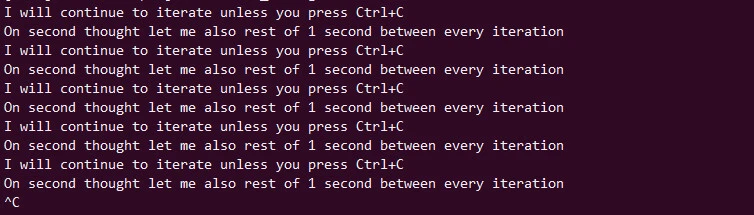
In this shell script example I will just print something on the screen,
and this will continue unless the end user intervenes and presses
Ctrl+C to terminate the loop
Although I also added a sleep
for 1 second to avoid eating my resources.
#!/bin/bash

while true
do
   echo "I will continue to iterate unless you press Ctrl+C"
   echo "On second thought let me also rest of 1 second between every iteration"
   sleep 1s
done
The output from this script:
Example-3: Use bash while loop to read line by line from a file
This is one of the most used functionalitywhere the loop will go
through every line of the file and you can perform your task on
individual line
The syntax to read line would be:
FILE="/path/to/your/file"

while read line;
do
   CONSEQUENT-COMMANDS
done < $FILE
I hope the syntax is clear enough to understand.
- You can use any variable name instead of
FILE - The content of the file which is defined using
FILEvariable would be given as INPUT using “< $FILE” near “done” - So the loop would iterate over individual line using “
read line” - You can replace
CONSEQUENT-COMMANDSwith your function to performinlineactivity
This is a simple script where we print individual lines from
/etc/hosts file and also prepend line number to each line
#!/bin/bash

FILE="/etc/hosts"

LINE_NO=1
while read line
do
   echo "Line Number $LINE_NO: $line"
   LINE_NO=$(($LINE_NO+1))
done < $FILE
The output from this script

Let me give you a practical example where we will go through below
file content /tmp/grub which contains the GRUB2 content.
GRUB_TIMEOUT=5
GRUB_DISTRIBUTOR="$(sed 's, release .*$,,g' /etc/system-release)"
GRUB_DEFAULT=saved
GRUB_DISABLE_SUBMENU=true
GRUB_TERMINAL_OUTPUT="console"
GRUB_CMDLINE_LINUX="resume=/dev/mapper/rhel-swap rd.lvm.lv=rhel/root rd.lvm.lv=rhel/swap rhgb quiet biosdevname=0 net.ifnames=0"
GRUB_DISABLE_RECOVERY="true"
GRUB_ENABLE_BLSCFG=true
We will perform below tasks in this shell script:
- Define
FILEvariable (you can choose any name for the variable) with the absolute path of the file - Take backup of the file before performing any task
- Perform iteration by reading individual
lineof the provided file - If
GRUB_TIMEOUTis found the replace the timeout value5with10 - If
GRUB_CMDLINE_LINUXis found then appendipv6_disable=1at the end of the line - Append
LINE_NOvariable with1every time the loop reads one line. This will help us get theline numberwhich the loop is reading - We will use
sedto performin filereplacement using the linux number provided byLINE_NO - The
sedmay be complex for beginners so you can ignore that part, I just want to show you a practical example of how we can utilise inline task using while loop
#!/bin/bash

FILE="/tmp/grub"

# take backup
cp $FILE ${FILE}.bkp

LINE_NO=1
while read line
do
   if [[ $line =~ GRUB_TIMEOUT ]];then
      echo "Found GRUB_TIMEOUT, performing replacement"
      sed -i ${LINE_NO}'s/5/10/g' $FILE
      echo "" # Adding new line for cleaner output
   elif [[ $line =~ GRUB_CMDLINE_LINUX ]];then
      echo "Found GRUB_CMDLINE_LINUX, disabling ipv6"
      sed -i ${LINE_NO}'s/"$/ ipv6.disable=1"/' $FILE
   fi
   LINE_NO=$(($LINE_NO+1))
done < $FILE
After executing the script, below is our updated content
GRUB_TIMEOUT=10
GRUB_DISTRIBUTOR="$(sed 's, release .*$,,g' /etc/system-release)"
GRUB_DEFAULT=saved
GRUB_DISABLE_SUBMENU=true
GRUB_TERMINAL_OUTPUT="console"
GRUB_CMDLINE_LINUX="resume=/dev/mapper/rhel-swap rd.lvm.lv=rhel/root rd.lvm.lv=rhel/swap rhgb quiet biosdevname=0 net.ifnames=0 ipv6.disable=1"
GRUB_DISABLE_RECOVERY="true"
GRUB_ENABLE_BLSCFG=true
So the inline replacement with while loop was successful.
Example-4: Use bash while loop with “break” statement
- As I also said earlier one of the good or bad things with while loop, it’s advantage of running the loop for infinite period of time until the condition matches
- We have used
breakstatement with for loop earlier so the usage is same also with while loop. breakstatement is used to come out of the iteration once a certain condition is matched.
The syntax to run infinite loop with break statement would be
while [CONDITION];
do
   CONSEQUENT-COMMANDS
    if [CONDITION_MATCH]
    then
       break #Exit the loop and go to SOME_COMMAND
    fi
   [sleep {value}]
done
SOME_COMMAND
- Make sure you add a
breakstatement to exit the loop or else the loop would continue to run for infinite period of time - I would also recommend adding
sleepin the loop or else the iteration would be very fast eating up the system resources, I have at least never performed such iteration without sleep. - I have added an
ifcondition in the syntax only for better understanding, it is also possible to break the loop without if condition, it all depends on requirement - But in most situations we do end up using
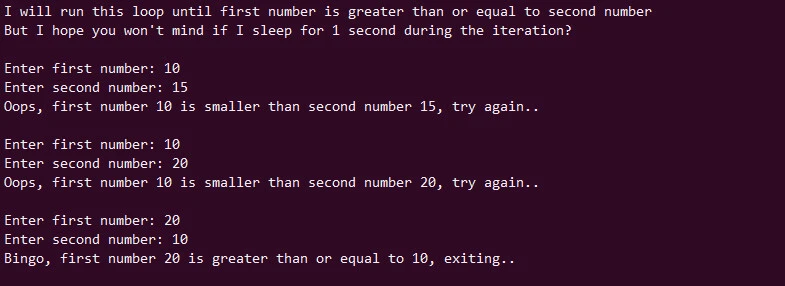
if elif and elsecondition to usebreakstatement - In this script I will ask user for two numbers
- The
loopwill continue to run until the first provided number is greater than or equal to second number - Now we could have also used comparison operator within the
while CONDITIONi.e.while [ $a -ge $b ]but I have used a differentif else(I hope you don’t mind)
#!/bin/bash

echo "I will run this loop until first number is greater than or equal to second number"
echo "But I hope you won't mind if I sleep for 1 second during the iteration?"
echo "" # new line for cleaner output

while true
do
  read -r -p "Enter first number: " a
  read -r -p "Enter second number: " b

  if [ $a -ge $b ];then
     echo "Bingo, first number $a is greater than or equal to $b, exiting.."
     echo "" # new line for cleaner output
     break
  else
     echo "Oops, first number $a is smaller than second number $b, try again.."
     echo "" # new line for cleaner output
     sleep 1s
  fi
done
The output from this script:
Let us also take one practical example:
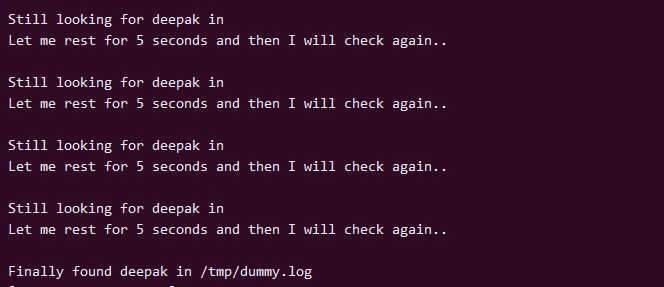
I will write a script to
grep for a certain
string in a file, and until the script finds this string it will
continue to run.
Also add a sleep for 5 seconds to avoid eating up system resources
Add break statement to come out of the loop once the string is found
in the file
#!/bin/bash

VAR="deepak"
LOGFILE="/tmp/dummy.log"

while true
do
   # Search for $VAR in $LOGFILE. This will return TRUE if found
   egrep -q $VAR $LOGFILE
   # In bash $? is used to check the exit status of last executed command
   # This will return 0 if the command is successful
   if [ $? == 0 ];then
      echo ""
      echo "Finally found $VAR in $LOGFILE"
      break
   else
      echo ""
      echo "Still looking for $VAR in $LOFILE"
      echo "Let me rest for 5 seconds and then I will check again.."
      sleep 5s
   fi
done
The output from this script:
Why not use exit instead of break?
As exit can also help me come out of the loop? Not completely
correct, EXIT will come out of the script but with BREAK you will
only come out of the LOOP, confused?
This is an important
difference. Your script may still want to perform many other task
out of the LOOP so if you use exit then all the remaining tasks would
FAIL.
Let me show you with an shell script example (with exit):
#!/bin/bash

echo ""
echo "I will run this loop until first number is greater than or equal to second number"
echo "But I hope you won't mind if I sleep for 1 second during the iteration?"
echo "" # new line for cleaner output

while true
do
  read -r -p "Enter first number: " a
  read -r -p "Enter second number: " b

  if [ $a -ge $b ];then
     echo "Bingo, first number $a is greater than or equal to $b, exiting.."
     echo "" # new line for cleaner output
     exit 0
  else
     echo "Oops, first number $a is smaller than second number $b, try again.."
     echo "" # new line for cleaner output
     sleep 1s
  fi
done
The output from this script:

As you see the script exited when the CONDITION matched and didn’t
executed our echo statement which was to be run outside the while
loop.
Let us run the same shell script with break statement
#!/bin/bash

echo ""
echo "I will run this loop until first number is greater than or equal to second number"
echo "But I hope you won't mind if I sleep for 1 second during the iteration?"
echo "" # new line for cleaner output

while true
do
  read -r -p "Enter first number: " a
  read -r -p "Enter second number: " b

  if [ $a -ge $b ];then
     echo "Bingo, first number $a is greater than or equal to $b, exiting.."
     echo "" # new line for cleaner output
     break
  else
     echo "Oops, first number $a is smaller than second number $b, try again.."
     echo "" # new line for cleaner output
     sleep 1s
  fi
done
The output from this script:
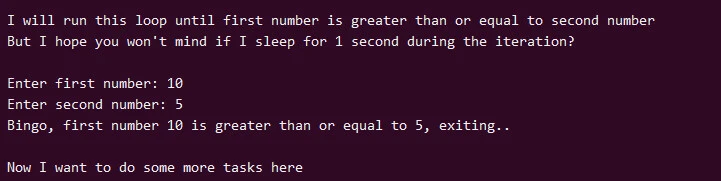
This time our echo statement outside the loop was executed, so you
should know when to use exit and break statement.
Example-5: Use bash while loop with “continue” statement
The usage of continue statement is similar to what we used with for loop i.e.
to come out from the current iteration and allow the loop to
continue without coming out of the loop
The syntax to use continue statement would be little different
compared to break statement, especially the order in which you execute
COMMANDS
while [ CONDITION ]
do
  CONSEQUENT-COMMANDS
  if [CONDITION_MATCH]
  then
    continue   # Ignore the current iteration and go to next in the loop and skip SOME_COMMAND
  fi
  SOME_COMMAND
done
This is a simple script to understand the usage of continue statement
#!/bin/bash

LINE_NO=0
while true
do

   LINE_NO=$((LINE_NO+1))
   if [[ $LINE_NO -eq 2 ]];then
      continue
   elif
      [[ $LINE_NO -eq 5 ]];then
      echo "Line Number: $LINE_NO [exiting]"
      break
   fi
   echo "Line Number: $LINE_NO"
done
- I am appending the value of
LINE_NOby1in every iteration - The iteration will execute until the
$LINE_NOvariable is less than or equal to5 - During the iteration run if
LINE_NObecomes equal to2then skip the iteration andcontinuewith the loop - Break the loop if
LINE_NOis equal to5
The output from this script:
Line Number: 1
Line Number: 3
Line Number: 4
Line Number: 5 [exiting]
Example-6: Use nested while loop in bash
We can also use nested while loop in a shell script based on your requirement. You can decide to choose conditional or comparison operator in the loop.
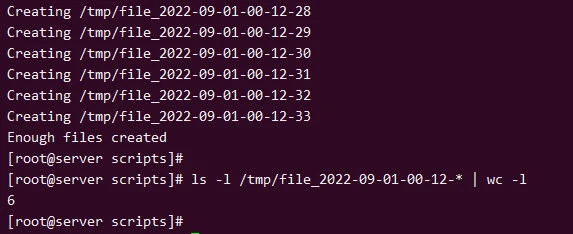
- In this shell script I have created nested while loop
- The main while loop will continue to look for files under
/tmpand once the number of files reaches greater than or equal to5 - The nested loop will create files with an increment and also add
date+timestampwith the file - This nested loop will create files until the
LINE_NOvariable is less than equal to5 - The main loop will
breakonce the file count becomes greater than equal to5
#!/bin/bash

LINE_NO=0
while true
do

   # Run this loop until LINE_NO is less than or equal to 5
   while [ $LINE_NO -le 5 ]
   do
      file="/tmp/file_`date +%F-%H-%M-%S`"
      # Create file is date timestamp
      echo "Creating $file"
      touch $file
      LINE_NO=$(($LINE_NO+1))
      sleep 1
   done

   # Count the number of files under /tmp with name starting with file
   file_count=`ls -l /tmp/file* | wc -l`
   # if number of files is greater than or equal to 5, break the main while loop
   if [ $file_count -ge 5 ];then
      echo "Enough files created"
      break
   fi
   sleep 1
done
The output from this script
Conclusion
Bash scripts are still preferred over other programming language when we have to write system commands to perform day to day administration related tasks such as taking backups, monitoring a service etc. These are very small tasks and can be easily covered using bash scripts and while loop works like a charm in many such situations.
So we learned about while loop and it’s usage in different scenarios with real time practical shell script examples.
Lastly I hope this beginners tutorial guide on bash while loop in Linux and Unix was helpful. So, let me know your suggestions and feedback using the comment section.
Further Readings
Bash Guide for Beginners: The while loop
Related Searches: bash while loop, bash do while loop, bash script while loop, bash while loop one line, bash while true loop, do while loop in bash, do while loop in shell script bash, while loop in bash script example, shell while loop, bash script while loop example
