

If you have a string in Bash and want to split it into an array, this guide gives you the fastest working commands first, followed by optional advanced methods if you need more control.
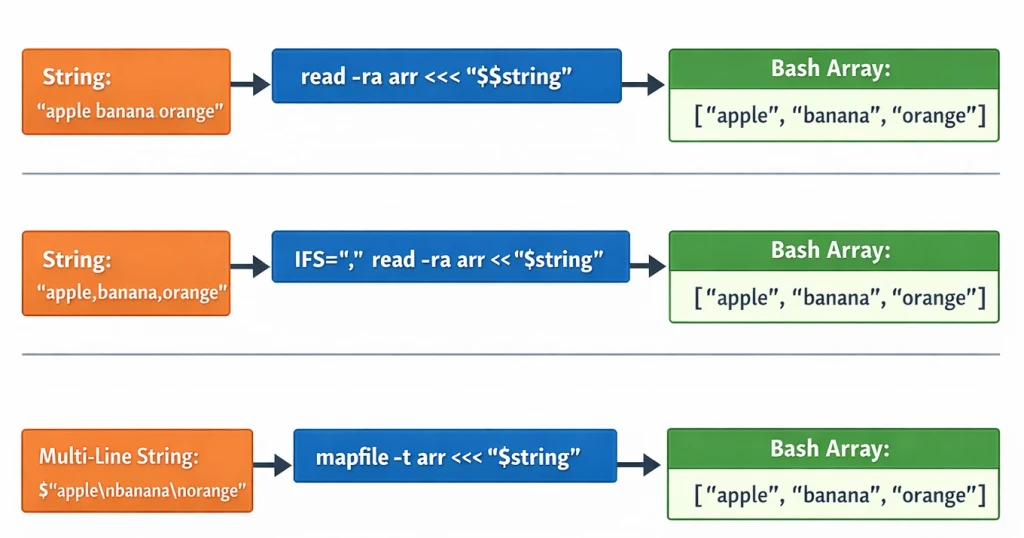
Quick Answer: Bash Split String into Array (Recommended)
string="apple banana orange"
read -ra arr <<< "$string"
echo "${arr[@]}"
✔ Works in Bash
✔ Splits on whitespace
✔ Safe for most scripts
For most Bash scripts, this is the recommended and sufficient solution.
Common Mistakes When Splitting Strings in Bash
# ❌ Don't do this
arr=($string)
Why it’s dangerous:
- Breaks on spaces inside values
- Fails with special characters
- Unsafe for user input
⚠️ Note: Arrays are a Bash feature. POSIX shells like
shdo not support arrays. If your script uses#!/bin/sh, these methods will not work.
Split String into Array Using a Delimiter
Use IFS (Internal Field Separator) when your string uses a custom
delimiter.
Comma-separated string
IFS=',' read -ra arr <<< "apple,banana,orange"
Pipe-separated string
IFS='|' read -ra arr <<< "apple|banana|orange"
Semicolon-separated string
IFS=';' read -ra arr <<< "apple;banana;orange"
Split Multi-Line String into Array (Best Practice)
For strings containing newlines, mapfile (also called readarray) is
the safest and cleanest method.
string=$'apple\nbanana\norange'
mapfile -t arr <<< "$string"

echo "${arr[@]}"
Why this method is preferred:
- No
IFSside effects - Handles multi-line input reliably
- Ideal for files and command output
Which Method Should You Use?
| Scenario | Recommended Method |
|---|---|
| Space-separated string | read -ra |
| Custom delimiter | IFS + read |
| Multi-line input | mapfile |
| Avoid modifying IFS | mapfile |
Advanced Methods (Optional)
The methods below are not required for most use cases. Use them only when the quick solutions above do not fit your requirement.
Using Parentheses (Simple but Limited)
#!/bin/bash

# Defining a string
string="apple banana orange"

# Splitting the string into an array
myvar=($string)

# Output the array and its length
echo "My array: ${myvar[@]}"
echo "Number of elements in the array: ${#myvar[@]}"
Limitations:
- Splits only on whitespace
- No custom delimiter support
- Word splitting can cause issues with special characters
⚠ Avoid this method when handling untrusted input or strings containing special characters.
Using Loops for Full Control
#!/bin/bash

# Define a string
string="apple banana orange"

# Initialize an empty array
myvar=()

# Use loop to bash convert string to array
for word in $string; do
    myvar+=("$word")
done

# Output the array and its length
echo "My array: ${myvar[@]}"
echo "Number of elements in the array: ${#myvar[@]}"
Use this approach when:
- You need conditional logic
- You want to modify elements while splitting
Using tr (translate or delete characters) for Pre-Processing
string="apple|banana|orange"
string=$(echo "$string" | tr '|' ' ')
read -ra arr <<< "$string"
This is useful when input delimiters must be transformed before splitting.
Frequently Asked Questions
How do I split a string by a specific delimiter in Bash?
Use IFS with read, for example:
IFS=',' read -ra arr <<< "$string".
Can I split a string into an array without using IFS?
Yes. read -ra arr <<< "$string" splits the string using whitespace by
default.
How can I split a string into an array using multiple delimiters?
Set IFS to multiple characters, for example:
IFS=',;|' read -ra arr <<< "$string".
What is the role of IFS in splitting strings in Bash?
IFS defines word boundaries that Bash uses when splitting input into fields or array elements.
How can I preserve whitespaces when splitting a string into an array?
Use a delimiter that does not appear inside the values, or store values
line-by-line and use mapfile.
Is it possible to split a multi-line string into an array in Bash?
Yes. Use mapfile -t arr <<< "$string" to store each line as an array
element.
When should I use loops to split a string into an array?
Use loops only when you need conditional logic or want to modify elements while splitting.
Can regular expressions be used to split strings into arrays in Bash?
Regex can be used inside loops for advanced parsing, but it is not required for standard string splitting.
Are these methods Bash-specific or portable across shells?
These methods are Bash-specific; POSIX shells like sh do not support
arrays.
Summary
To split a string into an array in Bash:
- Use
mapfilefor multi-line input - Use
read -rafor space-separated strings - Use
IFS + readfor custom delimiters
For further in-depth study and exploration of these topics, you may refer to the official GNU Bash documentation:
- Bash Manual
- Advanced Bash Scripting Guide
- Bash Pitfalls (common issues and challenges encountered in Bash scripting)
- man page of tr
- man page of read
- What is IFS in Bash?
