

How to increment variable in bash shell script? How to add 1 to a variable for every for loop? How to increment counter in bash? How to perform bash variable plus 1?
In this tutorial we will cover these questions. In my previous article we learned about concatenating string which partially covered similar topic of incrementing a variable. Now let’s learn about adding values and incrementing variables in shell scripts when working with loop.
Increment variable with for loop
Example-1:
In this section we will execute a for loop which will iterate based on variable value. The value of this variable will be incremented up to a defined threshold.
#!/bin/bash

for (( i=0; i <= 5; i++ )); do
    echo $i
done
Here,
- We have defined an initial value for i=0 so the loop will start from
0, you can change it to any other value from where you wish to start the loop - Then the second condition is the threshold where we define the maximum
value till the point where the loop should execute. In our case the
loop shall run until
iis less than or equal to5but you may choose any other conditional operator based on your requirement. - The third condition is where we increment the value of
ivariable by plus 1
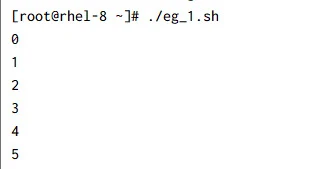
Output from this script:
Example-2:
In this example also we will use for loop but now we don’t have a list of numbers to iterate over, instead I have a list of hosts. I want to perform some action with individual hosts but I also don’t want to loop run longer than 3 seconds so I will introduce a timeout.
So here our timeout variable will be incremented with every loop, and once the timeout value is equal to 3 then the loop will break:
#!/bin/bash

declare -a hosts="ab cd ef gh ij"

timeout=1
for host in ${hosts[@]}; do
    echo $host
    if [[ $timeout -eq 3 ]];then
       echo "timed out"
       break
    fi
    sleep 1
    timeout=$((timeout+1))
done
Here we are incrementing our variable by adding 1 at then end of each
loop using timeout=$((timeout+1)), we could have also used
((timeout++)) which will also increment the timeout variable by one.
But I prefer the first one because I have more control there, if I have
a requirement to increment the variable by any other value such as 5
then we can just update the code to timeout=$((timeout+5))
Alternatively we can also use ((timeout=timeout+1)) which can also
give us an option to add a custom value for increment. So now the
timeout variable will be incremented by 5 in every loop.
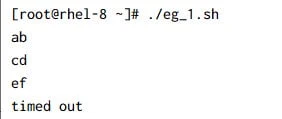
Output from this script:
Increment variable by plus 1 with while loop
Example-1:
Let us now take some examples with while loop. You may have a situation to update a file’s content at some respective line so we can read a file line by line using while loop. In the same script we can add a variable which will count the line number and based on this line number variable we can perform inline operation.
For example, I want to add “ipv6_disable=1” in the line with
GRUB_CMDLINE_LINUX variable on /etc/sysconfig/grub file. Now this
entry has to be appended as a last entry of this line.
So,
- we will use a while loop to read through the file
- capture line number into
LINEvariable - based on the line number from
LINEwe will usesedto perform our operation
Below is my sample script with all the comments to help you understand the script:
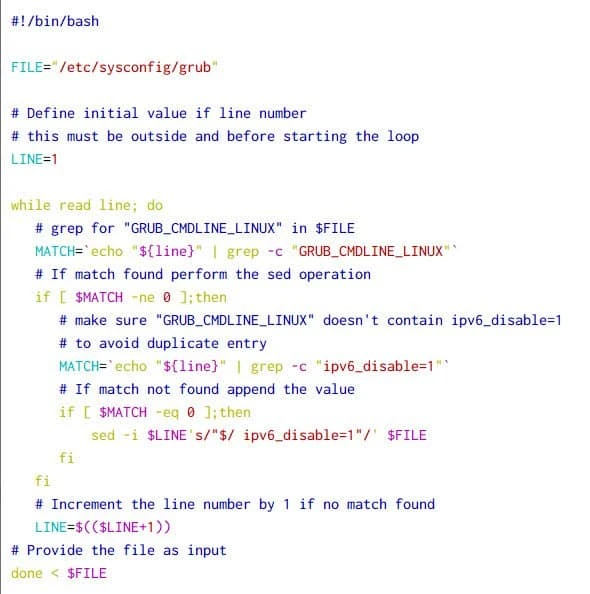
So we have used the code to increment our line number as used with for
loop earlier LINE=$((LINE+1)). This is the only part which does the
magic. You always have to remember two things when using such variable
for incrementing
- You must initialize an empty variable first as I did by defining
LINE=1as the starting of the script - The initialization must be done before starting the loop, as if you define it inside the loop then the initial value will change every time the variable is incremented which will not give proper results
Output from this script:
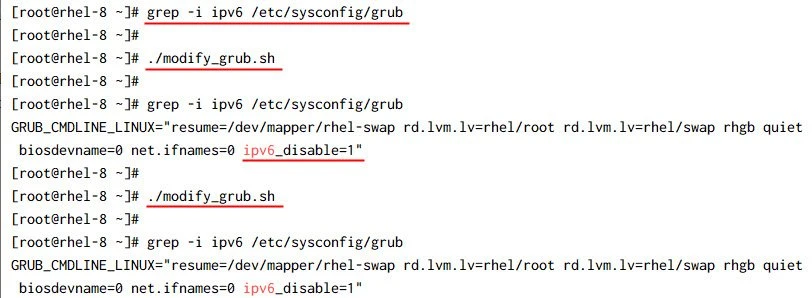
So the script is working as expected, it checks for duplicate entries
and appends ipv6_disable=1 to disable IPv6 by using LINE to get the
line number.
Check for success and failed scenario by incrementing counter
Now in all the above example we utilised incremental variable to perform certain task by adding 1 to the variable. Now we will increment counter just to determine the status of command execution and later use that to conclude our execution.
In this script we check for connectivity of target host. To validate the
same I have added a “failed” variable and if the ping test fails then
I increment the counter value. Once the ping test is complete then I
will check if “failed” variable’s value is more than what we have
initialized i.e. 0 and then accordingly we inform the user.
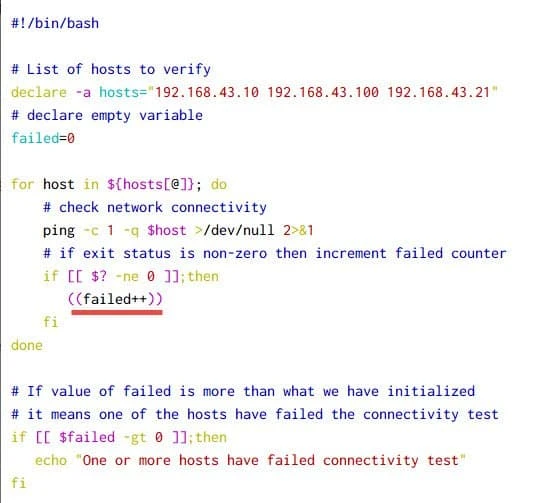
Output from this script:
~]# ./check_hosts.sh
One or more hosts have failed connectivity test
Now if your requirement is also to have the list of failed hosts then
you can use += operator to
concatenate
strings in a variable.
Different methods to perform incremental operation in bash
Here there is a consolidated list of
methods which you can choose based on your shell and environment to
increment a variable. In the above script where I have used
((failed++)) or LINE=$(($LINE+1)), just replace this with any of the
methods from the below table.
| Number | Incremental Variable |
|---|---|
| 1 | var=$((var+1)) |
| 2 | var=$((var++)) |
| 3 | ((var=var+1)) |
| 4 | ((var+=1)) |
| 5 | ((var++)) |
| 6 | ((++var)) |
| 7 | let "var=var+1" |
| 8 | let "var+=1" |
| 9 | let "var++" |
| 10 | let var=var+1 |
| 11 | let var+=1 |
| 12 | let var++ |
| 13 | declare -var var; var=var+1 |
| 14 | declare -var var; var+=1 |
| 15 | var=$(expr $var + 1) |
| 16 | var=`expr $var + 1` |
Conclusion
In this tutorial we learned about different incremental operators available in bash shell programming. You have to take care of certain things which I have highlighted multiple places in this article, such as position of the incremental variable, declare the var as integer, exiting the loop properly etc.
Lastly I hope the steps from the article was helpful. So, let me know your suggestions and feedback using the comment section.
