

Ansible facts is a term used for system information of the managed
nodes. Now the system information could be about OS distribution,
release, processor, IP address etc.The task of colleting this remote
system information is referred as “Gathering facts” and the
collected data or gathered information is referred as facts or variable.
We use “setup” module to gather facts from the managed nodes.
setup module to gather
facts with every execution.
There are two types of facts
- System default facts
- User defined facts
System default facts
A lot of data in our systems is automatically discovered and made available to Ansible by the managed hosts during the handshake process. This data is very useful and tells us everything about that system, such as:
- The hostname, network interface, and IP address
- The system architecture
- The operating system
- The disk drives
- The processor used and amount of memory
- Whether it is a VM; if yes, is it a virtualization/cloud provider?
You can use “setup” module with
ad-hoc
commands
[ansible@controller ~]$ ansible server2 -m setup
This will give you a long list of values for server2. You can further
add filter with the setup module to only get the required data.
In this example I only wish to get the installed kernel details
[ansible@controller ~]$ ansible server2 -m setup -a 'filter="ansible_kernel"'
server2 | SUCCESS => {
    "ansible_facts": {
        "ansible_kernel": "4.18.0-193.6.3.el8_2.x86_64",
        "discovered_interpreter_python": "/usr/libexec/platform-python"
    },
    "changed": false
}
You can go through the output of -m setup and choose the dictionary
keys to use them as filter. For more information on setup module and
available filters you can follow official ansible
documentation
User defined facts
In this section we will create some user defined facts which can be used by playbooks. This is definitely not mandatory and based on requirement you may choose to create custom facts.
- To create custom facts, we must create
/etc/ansible/facts.don the respective managed nodes - Inside the
facts.ddirectory you can place your facts file with extension.fact - The format of these facts file must be in JSON or Dictionary format.
- The fact file must have executable permission
We will use ansible to create the fact script. For the sake of
demonstration I will only use server2 but you can use all your managed
nodes.
First of all let us create a directory on server2
[ansible@controller ~]$ ansible server2 -m file -a "path=/etc/ansible/facts.d state=directory" --become
Now I will create a fact file locally on my ansible engine which I will
copy to the managed nodes using ansible. Following is my fact file
/tmp/python_version.fact which will collect the python version:
#!/bin/bash

python_ver=$(python3 --version | cut -d' ' -f2)

cat << EOF
{ "Python_version": "${python_ver}" }
EOF
This script will collect the python version and then print the output in JSON format.
So we will copy this file to server2 using ansible and modify user and
group owner to ansible with file permission as 700 so only ansible
can access this file.
[ansible@controller ~]$ ansible server2 -m copy -a "src=/tmp/python_version.fact dest=/etc/ansible/facts.d/ mode=700 owner=ansible group=ansible" --become
Verify the file on server2
[ansible@server-2 ~]$ ls -l /etc/ansible/facts.d/python_version.fact
-rwx------ 1 ansible ansible 113 Sep 20 02:49 /etc/ansible/facts.d/python_version.fact
Now we can collect the facts for only this filter
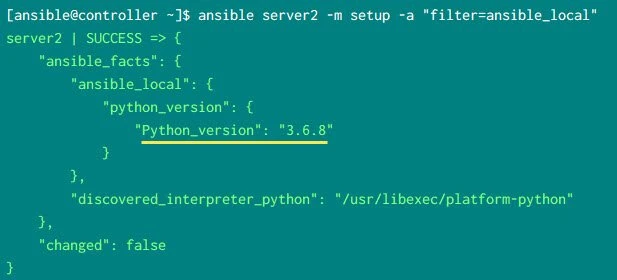
[ansible@controller ~]$ ansible server2 -m setup -a "filter=ansible_local"
Output from my controller node:
What’s Next
Next in our Ansible Tutorial we will learn about Ansible Variables and Data Types
