
Tested on Ubuntu 22.04 / 24.04 and Debian 12
The adduser command in Linux is used to create users and groups on
Ubuntu and Debian-based systems. Unlike useradd, the adduser command automatically creates the home directory, sets permissions, and prompts for user details, making it safer for day-to-day administration. It provides an interactive and safe way to manage user accounts using simple prompts and sensible defaults.
If you are searching for sudo adduser command examples, this article serves as a quick reference cheat sheet with practical, real-world usage.
In this guide, you will learn how to:
- Create normal and system users using adduser
- Create and manage groups
- Assign custom UID, GID, and GECOS values
- Configure home directories and login shells
- Use adduser in non-interactive scenarios
How the adduser Command Works
The behavior of the adduser command is controlled by the configuration file:
/etc/adduser.conf
When you execute the sudo adduser command, it automatically updates three critical system files:
- /etc/passwd: Stores user account information (UID, GID, home directory path).
- /etc/shadow: Contains encrypted password information for security.
- /etc/group: Stores the list of groups and their members.
Default UID/GID ranges, home directory paths, and shells are defined in /etc/adduser.conf.
adduser command syntax and options
Basic syntax:
sudo adduser username
Commonly used syntax variations
| Option | Purpose |
|---|---|
--system |
Create system user |
--uid |
Assign custom UID |
--gid |
Assign existing group |
--home |
Custom home directory |
--shell |
Set login shell |
Example:
sudo adduser --uid 2001 --gid 2001 --home /opt/app --shell /usr/sbin/nologin --gecos "App User" appuser
Basic User Creation with adduser
Create a New User
With this command, you can add a new user to the system. When adding a new user, you will be asked to enter some information.
sudo adduser username
Sample Output:
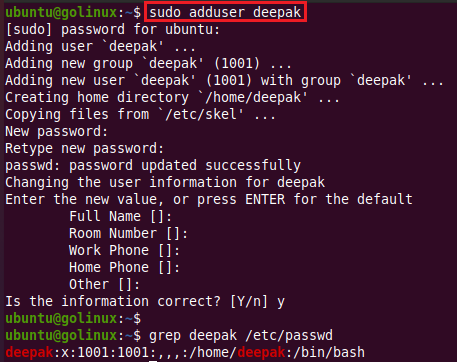
/etc/passwd contains the user account information in the following format.
username:password:userID:groupID:comment:user_directory:shell
- username : Login name of the user (1–32 characters).
- password : Contains
x, indicating the encrypted password is stored in/etc/shadow. - UID (User ID) : Unique numeric identifier for the user. Example:
1001for userdeepak. - GID (Group ID) : Primary group ID assigned to the user. Example:
1001for userdeepak. - GECOS (comment field) : Stores user details such as full name or description.
- home_directory : Default location of the user’s home directory (usually
/home/username). - login_shell : Default shell assigned to the user (usually
/bin/bash).
Create a System User
System users are typically used by background services and applications.
sudo adduser --system username
Sample Output:

Create a user with disabled login
This disables all login methods and prevents the user from logging in until a password is explicitly set.
sudo adduser --disabled-login username
Sample Output:
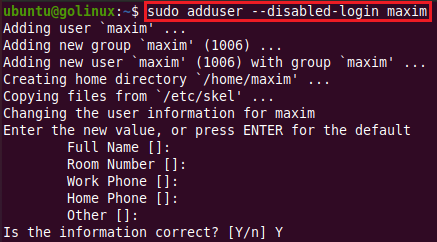
We can set or change the user password in the Linux system by using the
following passwd command.
ubuntu@golinux:~$ sudo passwd maxim
New password:
Retype new password:
passwd: password updated successfully
Create a user without password
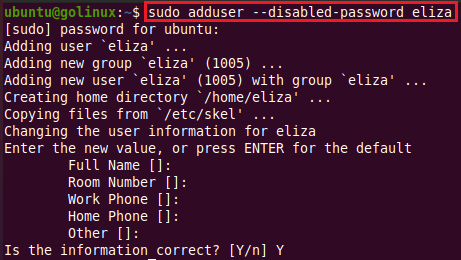
This is often used for SSH key-based authentication or automation.
sudo adduser --disabled-password username
Sample Output:
Managing Groups and Primary Membership
Create a New Group
Creates a group without adding any users.
sudo adduser --group groupname
Sample Output:
ubuntu@golinux:~$ sudo adduser --group linux
Adding group `linux' (GID 1002) ...
Done.
Create a System Group
Creates a system group along with a system user of the same name.
sudo adduser --system --group groupname
Sample Output:

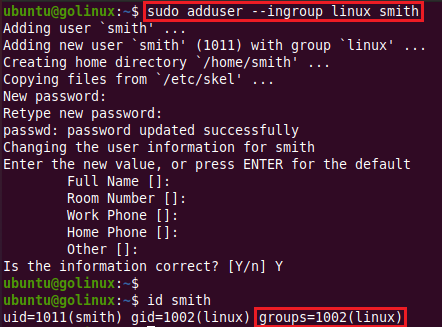
Assign a Primary Group During User Creation
The specified group must already exist on the system.
sudo adduser --ingroup GROUP username
Sample Output:
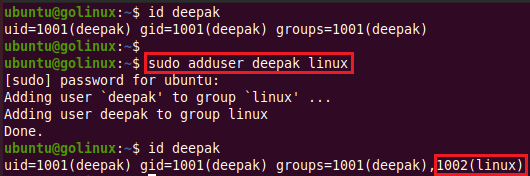
Add an existing user to an existing group
Updates group membership without creating a new user.
sudo adduser username groupname
Sample Output:
Customizing User IDs and Home Directories
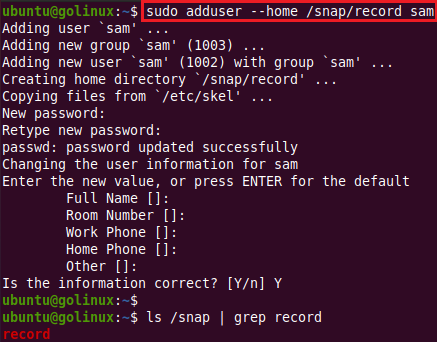
Set a Custom Home Directory
Useful when user data must be stored outside the default /home directory.
sudo adduser --home /custom/path username
Sample Output:
Here, we are adding a user ‘sam’ with its directory ‘record’ under the /snap directory.
Create a User Without a Home Directory
Commonly used for service accounts or restricted users.
sudo adduser --no-create-home username
Sample Output:
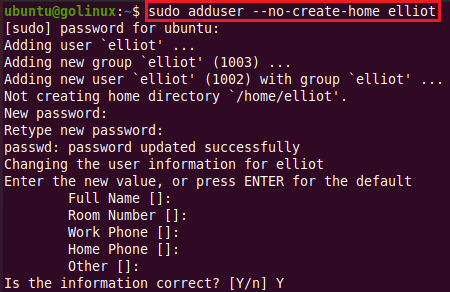
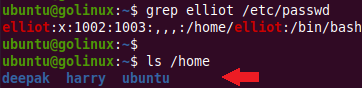
As we can see, the default home directory is /home/elliot but it is not created.
Assign a Custom UID
Helpful for maintaining UID consistency across systems.
sudo adduser --uid 4567 username
Sample Output:
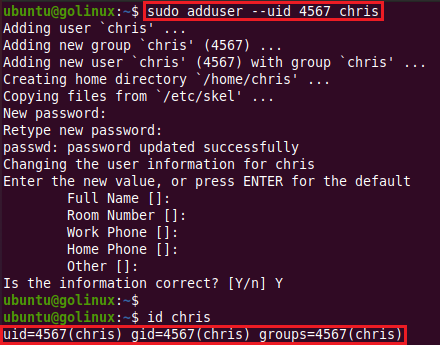
The user chris is assigned with a custom user ID 4567.
Assign a Specific GID
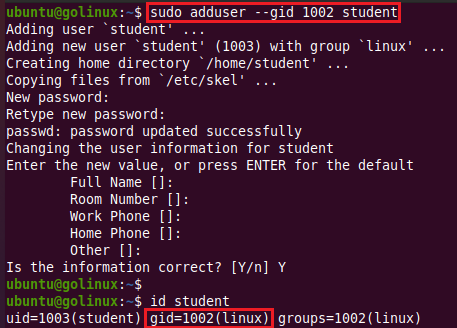
Adds the user to an existing group using its group ID.
sudo adduser --gid 1002 username
Sample Output:
Security and Access Control Options
Set a Custom Login Shell
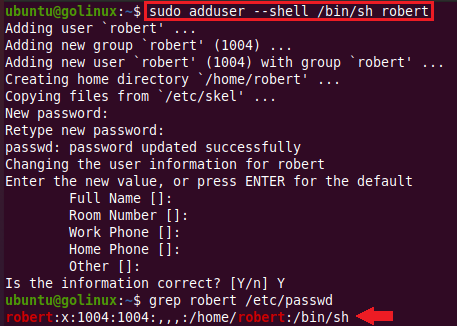
Overrides the default login shell defined in adduser configuration.
sudo adduser --shell /bin/zsh username
Sample Output:
User Metadata and Debugging Options
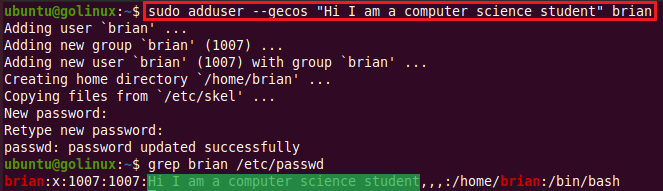
Add GECOS Information During User Creation
Stores user information such as full name and description.
sudo adduser --gecos "John Doe,Admin,1234567890" username
Sample Output:
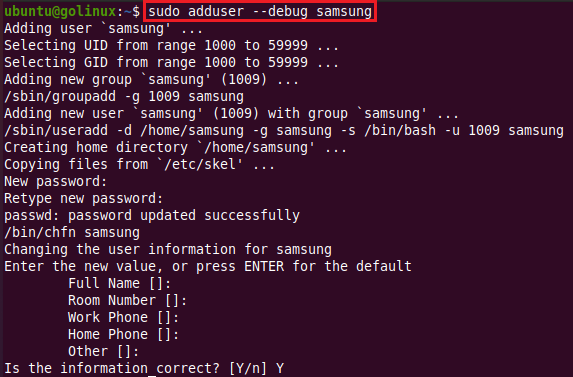
Enable debug mode in adduser
Displays verbose output useful for troubleshooting.
sudo adduser --debug username
Sample Output:
Frequently Asked Questions
1. What is the adduser command in Linux?
The adduser command is a high-level utility used to create users and groups on Ubuntu and Debian-based Linux systems.2. What is GECOS in adduser?
GECOS is a comment field used to store user information such as full name, department, or description.3. Can adduser create users non-interactively?
Yes. By supplying options such as –uid, –gid, –home, and –gecos, adduser can be used in scripts and automation.Conclusion
The adduser command in Linux provides a reliable and beginner-friendly approach to user and group management on Ubuntu and Debian systems. With these examples, you can confidently handle both basic and advanced user creation tasks using adduser.
