

Microsoft has its Identity Management suite to build around the Active Directory, and Red Hat has its identity management directory server. In this article I will share the steps to add Linux to Windows Active Directory Domain. The steps are validated by adding RHEL/CentOS 7 and 8 Linux to Windows Active Directory configured on Windows Server 2012 R2.
Some more articles on similar topic:
- How to join Linux client to Windows AD Domain using realmd with SSSD (CentOS/RHEL 7/8)
- How to join Linux client to Windows AD Domain using adcli with SSSD (CentOS/RHEL 7/8)
- How to join Linux client to Windows AD Domain using winbind (CentOS/RHEL 7/8)
1. Overview on realmd tool
RealmD is a tool that will easily configure network authentication and domain membership. With RHEL/CentOS 7, RealmD is fully supported and can be used to join IdM, AD, or Kerberos realms. The main advantage of using realmd is the ability to provide a simple one-line command to enroll into a domain as well as configure network authentication.
For example, realmd can easily configure:
- PAM Stack
- NSS Layer
- Kerberos
- SSSD
- Winbind
Therealmdsystem supports the following domain types:
- MicrosoftActiveDirectory
- RedHat EnterpriseLinux IdentityManagement
The following domain clients are supported byrealmd:
- SSSD for both RHEL/CentOS Identity Management and Microsoft Active Directory
- Winbind for MicrosoftActiveDirectory
Following table lists some of the most used realm commands:
| Command | Description |
|---|---|
| realm discover | Run a discovery scan for domains on the network. |
| realm join | Add the system to the specified domain. |
| realm leave | Remove the system from the specified domain. |
| realm list | List all configured domains for the system or all discovered and configured domains. |
| realm permit | Enable access for specified users or for all users within a configured domain to access the local system |
| realm deny | Restrict access for specified users or for all users within a configured domain to access the local system |
2. Lab Environment
For demonstrations in this article to add Linux to Windows AD Domain on RHEL/CentOS 7/8, we will use two virtual machines running in an Oracle VirtualBox installed on my Linux Server virtualization environment.
I have written another article with the steps to add Linux to Windows AD Domain on RHEL/CentOS 8 setup using Samba winbind.
We have a Microsoft Server 2012R2 Active Directory Domain Controller with the IP address 192.168.0.107 and the CentOS 8 host with the IP address 192.168.0.117. In this article I will only cover the part to add Linux to Windows AD Domain on the client side. So this article to add Linux to Windows AD Domain requires a pre-configured Windows Active Directory.
3. Pre-requisites to add Linux to Windows AD Domain
3.1 Update /etc/resolv.conf
Make sure RHEL/CentOS client machine is able to resolve Active Directory
servers. To do this update your /etc/resolv.conf with the IP address
of your Domain Controller on your RHEL / CentOS 7/8 client host.
[root@adcli-client ~]# cat /etc/resolv.conf
search www.golinuxcloud.com
nameserver 192.168.0.107
3.2 Verify Domain Name Resolution
Verify if the client is able to resolve the domain name:
[root@centos8 ~]# nslookup www.golinuxcloud.com
Server:         192.168.0.107
Address:        192.168.0.107#53

Name:   www.golinuxcloud.com
Address: 192.168.0.107
Verify the configuration for name resolution. In particular, verify the DNS SRV records.
 ~]# host -t SRV _kerberos._udp.golinuxcloud.com.
_kerberos._udp.golinuxcloud.com has SRV record 0 100 88 win-71humtros3m.golinuxcloud.com.

 ~]# host -t SRV _ldap._tcp.golinuxcloud.com.
_ldap._tcp.golinuxcloud.com has SRV record 0 100 389 win-71humtros3m.golinuxcloud.com.

~]# host -t SRV _ldap._tcp.dc._msdcs.golinuxcloud.com
_ldap._tcp.dc._msdcs.golinuxcloud.com has SRV record 0 100 389 win-71humtros3m.golinuxcloud.com.
3.3 Install packages (RHEL/CentOS 7)
For minimal install servers, you need to install krb5-workstation
package , which provides klist command. Installadclipackage along
withsssd:
Here,
- sssd: The System Security Services daemon can be used to divert client authentication as required
- adcli: These are the tools for joining and managing AD domains
[root@adcli-client ~]# yum install adcli sssd authconfig realmd krb5-workstation oddjob oddjob-mkhomedir
3.4 Install packages (RHEL/CentOS 8)
Following list of packages are required for integrating Linux client to
Windows domain using realm. We need oddjob oddjob-mkhomedir to make
sure the home directory is automatically created for domain users.
[root@centos8 ~]# dnf -y install realmd adcli sssd oddjob oddjob-mkhomedir samba-common-tools krb5-workstation authselect-compat
4. Using realm to join Linux to Windows Domain
With all the packages installed, we can use the realm command to add
Linux to Windows AD Domain and manage our enrolments. This command is
part of the realmd package that we added.
4.1 List configured domains
We can use the list subcommand to ensure that we are not currently
part of a domain:
[root@realm-client ~]# realm list
The output should be blank.
4.2 Discover available domains in the network
Now, we are ready to proceed with the next step i.e. to add Linux to
Windows AD Domain. With a simple environment, you will know the domain
that you want to join; at
least we certainly hope that you do. In our case, we do know it
and this is www.golinuxcloud.com.
Therealm discovercommand returns complete domain configuration and a
list of packages that must be installed for the system to be enrolled in
the domain.
[root@realm-client ~]# realm discover www.golinuxcloud.com
GOLINUXCLOUD.COM
  type: kerberos
  realm-name: GOLINUXCLOUD.COM
  domain-name: GOLINUXCLOUD.COM
  configured: no
  server-software: active-directory
  client-software: sssd
  required-package: oddjob
  required-package: oddjob-mkhomedir
  required-package: sssd
  required-package: adcli
  required-package: samba-common-tools
www.golinuxcloud.com
  type: kerberos
  realm-name: GOLINUXCLOUD.COM
  domain-name: www.golinuxcloud.com
  configured: no
4.3 Join Linux client to Windows domain
The realm joincommand then sets up the local machine for use with a
specified domain by configuring both the local system services and the
entries in the identity domain. The process run byrealm joinfollows
these steps:
- Running a discovery scan for the specified domain.
- Automatic installation of the packages required to join the system to the domain.
- Joining the domain by creating an account entry for the system in the directory.
- Creating the
/etc/krb5.keytabhost keytab file. - Configuring the domain in SSSD and restarting the service.
- Enabling domain users for the system services in PAM configuration and
the
/etc/nsswitch.conffile.
[root@realm-client ~]# realm join --user=Administrator www.golinuxcloud.com
Password for Administrator:
Initially I was getting following error while trying to join my Linux client to Windows domain using realm:
 ~]# realm join  --user=Administrator www.golinuxcloud.com
Password for Administrator:
See: journalctl REALMD_OPERATION=r597.2528
realm: Couldn't join realm: Failed to join the domain
In the journalctl logs I could find the following logs:
Mar 04 12:11:21 centos8 realmd[2314]:  ! Couldn't authenticate as: Administrator@GOLINUXCLOUD.COM: KDC has no support for encryption type
Mar 04 12:11:21 centos8 realmd[2314]:  ! Couldn't authenticate as: Administrator@GOLINUXCLOUD.COM: KDC has no support for encryption type
Mar 04 12:11:21 centos8 realmd[2314]: adcli: couldn't connect to GOLINUXCLOUD.COM domain: Couldn't authenticate as: Administrator@GOLINUXCLOUD.COM: KDC has no support for encryption type
Mar 04 12:11:21 centos8 realmd[2314]: adcli: couldn't connect to GOLINUXCLOUD.COM domain: Couldn't authenticate as: Administrator@GOLINUXCLOUD.COM: KDC has no support for encryption type
Mar 04 12:11:21 centos8 realmd[2314]: process exited: 2534
Mar 04 12:11:21 centos8 realmd[2314]:  ! Failed to join the domain
Mar 04 12:11:21 centos8 realmd[2314]:  ! Failed to join the domain
4.4 How to fix “KDC has no support for encryption type”?
Method-1
With RHEL/CentOS 8, rc4 is not in the DEFAULT crypto policy anymore, see
man crypto-policies for details.
Unfortunately it is still the common fallback in AD.
So we can add rc4-hmac in /etc/krb5.conf.d/crypto-policies as
permitted_enctypes as shown below.
[libdefaults]
permitted_enctypes = aes256-cts-hmac-sha1-96 aes256-cts-hmac-sha384-192 camellia256-cts-cmac aes128-cts-hmac-sha1-96 aes128-cts-hmac-sha256-128 camellia128-cts-cmac rc4-hmac
Now you can re-try to join Linux client to windows domain using realm:
[root@realm-client ~]# realm join --user=Administrator www.golinuxcloud.com
Password for Administrator:
Method-2
Here also we add rc4 encryption policy but instead of using
/etc/krb5.conf.d/crypto-policies, we will add following content in a
new file under /etc/krb5.conf.d/
~]# cat /etc/krb5.conf.d/enctypes
[libdefaults]
   default_tgs_enctypes = aes256-cts-hmac-sha1-96 aes256-cts-hmac-sha384-192 camellia256-cts-cmac aes128-cts-hmac-sha1-96 aes128-cts-hmac-sha256-128 camellia128-cts-cmac rc4-hmac
   default_tkt_enctypes = aes256-cts-hmac-sha1-96 aes256-cts-hmac-sha384-192 camellia256-cts-cmac aes128-cts-hmac-sha1-96 aes128-cts-hmac-sha256-128 camellia128-cts-cmac rc4-hmac
Now you can try to join Linux client to the windows domain using realm:
[root@realm-client ~]# realm join --user=Administrator www.golinuxcloud.com
Password for Administrator:
Method-3
You can allow weak encryption by defining the following under
[libdefaults] in /etc/krb5.conf file:
allow_weak_crypto = true
default_tgs_enctypes = arcfour-hmac-md5 des-cbc-crc des-cbc-md5
default_tkt_enctypes = arcfour-hmac-md5 des-cbc-crc des-cbc-md5
Now you can try to join Linux client to the windows domain using realm:
[root@realm-client ~]# realm join --user=Administrator www.golinuxcloud.com
Password for Administrator:
For more information you can follow Ensuring support for common encryption types in AD and RHEL
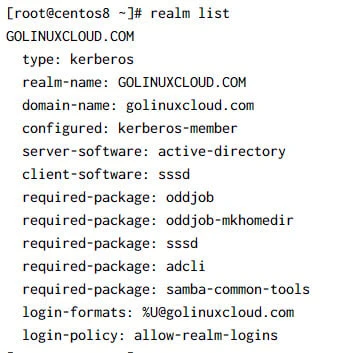
5. Verify if Linux client is integrated to windows domain
As a standard user, you can then list the domain you have joined using
the realm list command again. We should note that the output at first
may seem similar to the realm discover www.golinuxcloud.com command
that we ran earlier; however, on closer examination, we will see that we
are now a member server, as shown by configured: kerberos-member in
the following command:
6. Configure NSS for SSSD service
Next we need to configure NSS to authenticate the users in the Linux client and create home directories for AD users:
6.1 On RHEL/CentOS 7
You can use authconfig on RHEL/CentOS 7 server to configure PAM and make sure
the home directories of AD users are automatically created:
# authconfig --enablesssd --enablesssdauth --enablemkhomedir --update
Next enable and start/restart oddjobd.service
~]# systemctl enable --now oddjobd.service
6.2 On RHEL/CentOS 8
We will use authselect which is the new version of authconfig in
RHEL/CentOS 8 for configuring PAM files and making sure that home
directories of AD users are automatically created when they login to the
Linux client:
~]# authselect select sssd with-mkhomedir
Profile "sssd" was selected.
The following nsswitch maps are overwritten by the profile:
- passwd
- group
- netgroup
- automount
- services

Make sure that SSSD service is configured and enabled. See SSSD documentation for more information.

- with-mkhomedir is selected, make sure pam_oddjob_mkhomedir module
  is present and oddjobd service is enabled and active
  - systemctl enable --now oddjobd.service
Next enable and start/restart oddjobd.service
~]# systemctl enable --now oddjobd.service
7. Login as Active Directory User on Linux Client
Let us try to login to our Linux client using Windows AD user and verify if the home directory is automatically created. But first we need to check if our Linux client is able to get the user details of AD users:
~]# id GOLINUXCLOUD\\Administrator
uid=111800500(administrator@GOLINUXCLOUD.COM) gid=111800513(domain users@GOLINUXCLOUD.COM) groups=111800513(domain users@GOLINUXCLOUD.COM),111800520(group policy creator owners@GOLINUXCLOUD.COM),111800512(domain admins@GOLINUXCLOUD.COM),111800572(denied rodc password replication group@GOLINUXCLOUD.COM),111800518(schema admins@GOLINUXCLOUD.COM),111800519(enterprise admins@GOLINUXCLOUD.COM)
So our Administrator user from the AD is detected by the Linux client, so let’ try to switch user to Administrator:
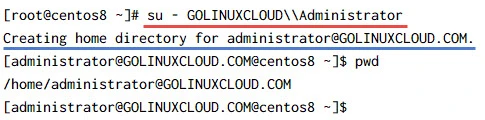
As expected the home directory for our AD user was automatically created.
8. Leaving Active Directory domain
There will be occurrences where the Linux server needs to be removed
from active directory domain. Often, this is the case where it is
removed from one active directory domain before being added to another
active directory domain. Should this be required, the realm command
makes the process easy.
The additional option: --remove will ensure that the computer account
is also deleted from the domain; otherwise, it should be deleted
separately.
[root@realm-client ~]# realm leave www.golinuxcloud.com --remove
Password for Administrator:
Summary
In this article we learned how we can join a Linux client (CentOS/RHEL 7/8) to Windows AD Domain using realmd tool. Therealmdsystem provides a clear and simple way to discover and join identity domains. It does not connect to the domain itself but configures underlying Linux system services, such as SSSD or Winbind, to connect to the domain.
It can run a discovery search to identify available AD and IdentityManagement domains and then join the system to the domain, as well as set up the required client services used to connect to the given identity domain and manage user access. Additionally, because SSSD as an underlying service supports multiple domains,realmdcan discover and support multiple domains as well.
Further Reading
You can go through the following articles to learn more about
integrating Linux client to Windows domain using realmd
Using
realmd to Connect to an Active Directory Domain
man page of krb5.conf
[libdefaults]
Related Searches: linux login with active directory, join linux server to active directory, add linux server to windows domain, linux active directory authentication, how to add a linux system to a windows domain, linux windows domain authentication, linux ad integration
